Interoperability CadnaB - CadnaR
By connecting CadnaB with CadnaR, building acoustics and room acoustics calculations can be linked. The CadnaR projects created in CadnaB are saved together with the CadnaB file. Hereby, for example, a detailed transmission calculation can be performed taking into account the positions of sources, receiver or obstacles within the room. In summary, the following use cases result:
Use cases Interoperability CadnaB - CadnaR
-
Management and organization of CadnaR projects.
-
CadnaB "room to room transmission" considering CadnaR models.
-
Automatic calculation of the spatially averaged reverberation time in CadnaB for all rooms which are linked to a CadnaR project.
Note
The room to room calculation is only possible using the CadnaB calculation standard ISO 12354.
Description use case 1
CadnaB is used to manage and organize CadnaR projects for a whole building. In this case no calculations take place within CadnaB. Room geometries modeled in CadnaB are available per room in CadnaR.
Advantages:
- Complex room floor plans are directly transferred to the CadnaR model.
- CadnaR project management for an entire building is clear and well structured.
Procedure use case 1
-
Model and save a project in CadnaB
-
Open the CadnaR Project Management in CadnaB via Tables | Manage CadnaR projects.
-
Via the plus symbol CadnaR projects can be created and then assigned to the CadnaB rooms. After confirming with "OK" CadnaR projects are created and displayed in the list box.
-
The dialog of the CadnaR projects can be opened by double-clicking on the entry of the respective CadnaR project in the list box. Clicking on "Save file and edit project in CadnaR" in die dialog opens the project in CadnaR.
Description use case 2
CadnaB "Room to room transmission" with consideration of the CadnaR models for the sending and receiving room. The room acoustic calculations take place considering the position of sources, receiver and obstacles within the room in CadnaR. The transmission through the separating component is calculated based on the building acoustic properties defined in CadnaB.
Procedure use case 2
For example, the procedure described below refers to a CadnaB project with two rooms (room name 1: Receiving Room; room name 2: Sending Room).
-
By means of the procedure as described in Procedure use case 1, CadnaR projects for at least two rooms with a common separation wall are to be generated.
-
Define the receiving room and the sending room and model these rooms in the respective CadnaR projects with their room equipment, sound sources and the receiver.
-
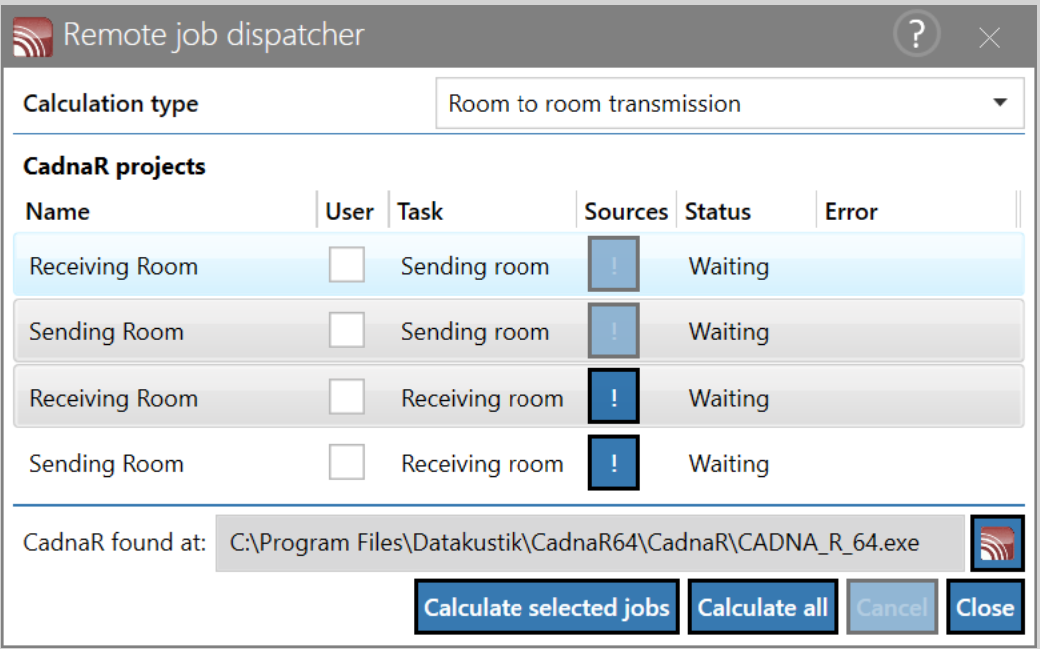
Open the CadnaR order management in CadnaB via Calculation | Start CadnaR calculation and proceed as follows:
-
Calculation type: Room to room transmission
-
In line (Name: Receiving Room; Task: Receiving room), click the exclamation mark in the "Sources" column. Select "Sending room" and then confirm the "Project dependencies" dialog with "OK".
-
Select line (name: Sending Room; task: Sending room) and line (name: Receiving Room; task: Receiving room) and start the calculation via "Calculate selected jobs" .
-
Afterwards, the calculations are performed automatically in CadnaR and CadnaB.
-
Note
The selection in the dialog is done via Multiselect. Thereby the lines can be marked with pressed Ctrl + mouse click. The selected lines are marked.
- The results can be accessed in the CadnaR projects.
This use case is shown in the demo tutorial as step-by-step instructions including sample files. The demo tutorial is available for download online at the following link:
https://www.datakustik.com/e-learning-center/web-tutorial/cadnab-tutorial/getting-started
Description use case 3
Automatic calculation of spatially averaged reverberation time for all CadnaB rooms linked to a CadnaR project. For each room a detailed CadnaR modeling can be performed to take into account e.g. obstacles or absorption areas within the room. The reverberation time calculation is done in CadnaR.
Procedure use case 3
-
Use the procedure in Procedure use case 1 to create a CadnaB project that contains at least one CadnaR project.
-
Open the CadnaR order management in CadnaB via Calculation | Start CadnaR calculation and proceed as follows:
-
Calculation type: Reverberation time
-
Select the desired rooms and start the calculation with "Calculate selected jobs".
-
Afterwards, the calculations are performed automatically in CadnaR.
-
-
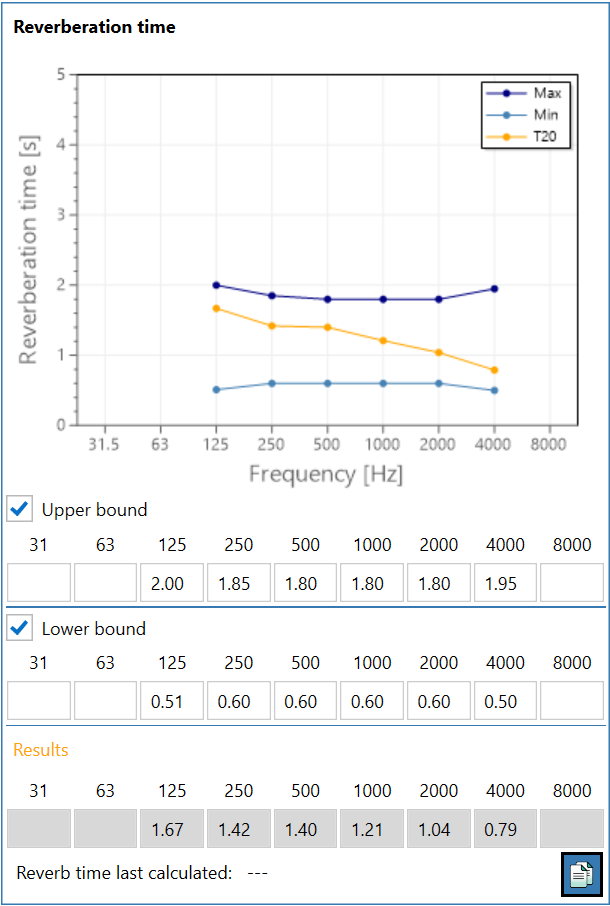
The results can be checked in the dialog of the respective CadnaR project in CadnaB. In addition, it is possible to show an upper and lower limit in the displayed diagram for the reverberation time.
More information about the settings available in CadnaB regarding CadnaR projects is given in the following sections: