Room
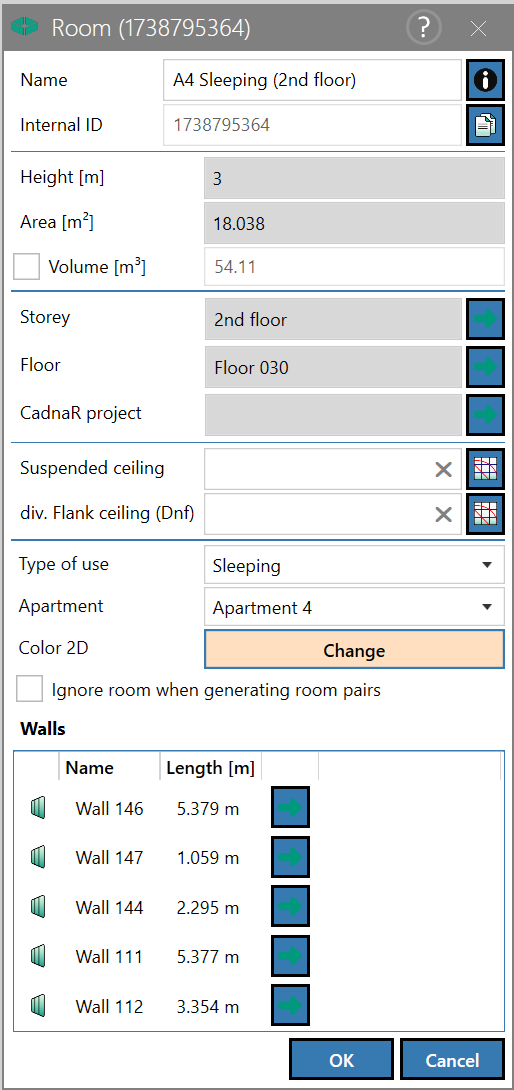
The "Room" object contains the surrounding walls and the floor, whereas the room‘s ceiling or its roof belongs to the "Storey" object (see Storey). Thus, in terms of the data structure, a room in CadnaB represents an open "box" without a ceiling or roof.
No distinction is made between sending and receiving rooms, as the sound transmission is always calculated automatically in both directions.
Dialog options
- Name, Memo-field
 , Internal ID: see Common Input Data
 - Height (m): corresponds to the height entered in the Storey dialog (see Storey)
- Area (m²)/Volume (m³): calculated from the room dimensions and the floor height. By activating the checkbox in front of Volume, the volume of the room can be overwritten.
- Storey: assigned storey
After clicking on the green arrow , the Storey dialog (see Storey) is opened.
 - Floor: assigned floor construction
After clicking on the arrow symbol, the Floor dialog (see Floor) for selecting the floor construction is opened. -
CadnaR project: Name of the CadnaR project (if assigned).
After clicking on the green arrow, the CadnaR Project dialog (see CadnaR Project) opens. -
Suspended ceiling: Display/selection of a suspended ceiling on the room side. To change the construction click on the respective selection box
 , click
  to delete.
Option „diverging Flank ceiling (Dn,f)“
This option is deactivated by default. In this case, the ceiling or roof construction selected in the Storey dialog (see Storey) is used to calculate the flanking transmission for all paths ij (vertical & horizontal).
If the option is activated, a different ceiling construction can be selected via the selection symbol , describing the flanking transmission via parameter by Dn,f or Dn,f,w (representing just the flanking path ij=Ff). This construction selection applies only to the current room and in particular does not simultaneously select the second flanking element in the neighboring room, the flanking transmission of which is also described by Dn,f or Dn,f,w. To achieve this, the same construction must be selected for the neighboring room (horizontally or vertically) by using the option "diverging Flank ceiling (Dn,f)".
Note
Please consider the following additional note: If a valid flanking construction (whose flanking transmission is described by Dn,f or Dn,f,w) has been selected for the same flanking element of two adjacent rooms, their flanking sound reduction index RFf or RFf,w (for both transmission directions) is calculated based on that Dn,f or Dn,f,w data. If this flank - at the same time - represents a partition to an adjacent room, the construction data selected for "Room" or „Floor“ is used for the associated flanking paths ij.
Note
If a Dnf is assigned to only one flank component of a transmission path or if two different Dnf are assigned, a consistency check is triggered. By confirming with "OK", the calculation is executed and the Dnf is taken into account at the junction. The input of the sending room is used for the calculation.
Further dialog options
- Type of use: If necessary, select a type of usage from the predefined or self-defined types of usages (see „Usages“ Mode). The specification offers, if necessary, to check a specified requirement.
- Apartment: The room can be assigned to a new or an existing apartment. A new "Apartment" object is created by selecting "New". Apartments and their names can be edited via their table (see Apartment).
- Color 2D: By default, each new room gets assigned automatically a color used for display in the 2D view. To change, click the button and choose a different color.
- Option "Ignore room when generating for room pairs": With this option activated, no sound insulation is calculated into this room (i.e. as a receiving room) and none originating from this room (i.e. as a sending room).
- "Walls" table: shows the walls belonging to the current room and their respective lengths (m). Clicking a wall highlights the corresponding object in the list and in the 2D view.After clicking on the green arrow in the last column, the corresponding Wall dialog (see Wall) opens.