Building
The Building dialog opens after double-clicking on the “Building” object in the object list in the “Project” mode (see „Project“ Mode).
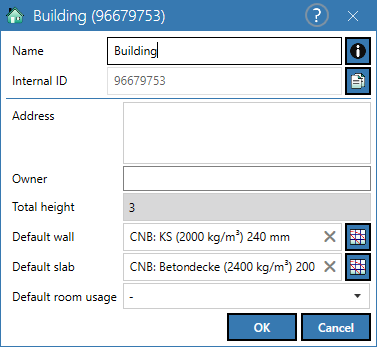
Dialog options
- Name, Memo-field
 , Internal ID: see Common Input Data
 - Address/Owner: informative text input
- Total height (m): total height of the building (based on the floor heights entered in the Edit storeys dialog (see Edit Storeys)
- Default wall: display/select the wall construction selected by default. To change the construction click on the respective selection field
 , click
  to delete.
 - Default slab: display/select the standard construction for the base plate. To change the construction click on the respective selection field , click to delete.
- Default room usage: display/select the type of room use (according to the ones available in the "Usage" mode, see „Usages“ Mode).