Managing CadnaR Projects
The starting point for a CadnaB-CadnaR interop project is at least a single room (for the “Calculate reverberation time” feature) or at least two rooms (for the “Calculate Room-to-Room transmission” feature). In both cases, the rooms to be used in the CadnaR calculation must be assigned to so-called "CadnaR projects". After successful assignment, the calculation is performed using the command „Start CadnaR Calculation“ (see Start CadnaR Calculation).
Dialog options
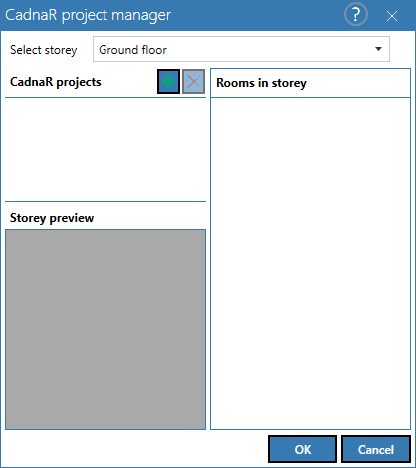
Select storey
Selection of the floor where a new object "CadnaR project" should be created or deleted. After selecting the floor, the list of CadnaR projects shows only the objects that are available in this floor (default: empty).
CadnaR Projekts list
Display of all objects "CadnaR project", which are available in the selected floor.
Create / delete CadnaR projekts
With the "+" sign new objects "CadnaR project" can be added to the selected floor. With the "X" sign existing objects can be deleted after selecting the entry.
Rooms in storey
After selecting a CadnaR project in the list "CadnaR Projects" (see above), all not yet assigned rooms of the floor are displayed here. If a room has already been assigned to a CadnaR object, it is also included in the list as selected. Rooms that are assigned to other CadnaR projects are not displayed. To assign a CadnaR project to a room, select the corresponding entry from the list.
Storey preview
The floor preview shows which room is currently selected (light blue) or which rooms are already assigned to a CadnaR project (red).