Construction Data Import
When accessing the construction data dialog via "New" (instead of "Details"), an additional button "Import" is available. With this function, construction data from the software INSUL (Marshall Day Acoustics) can be imported.
Note
This import will be available from INSUL version 9.0.24 and later.
INSUL export as well as CadnaB import is available for the following components including the construction data and the mentioned acoustic quantity:
- Wall \(\qquad\quad\) Sound Reduction Index (R)
- Ceiling \(\qquad\) Sound Reduction Index (R)
- Floor $\qquad\ \ \ $ Normalized Impact Sound Pressure Level (Ln)
- Flooring $\quad\ \ \ $ Improvement of Impact Sound Insolation (∆L)
- Glazing \(\qquad\) Sound Reduction Index (R)
Export from INSUL
The desired construction is modeled in INSUL. Subsequently, a *.xml file of the current construction can be generated via the Menu entry Export and the selection of CadnaB.
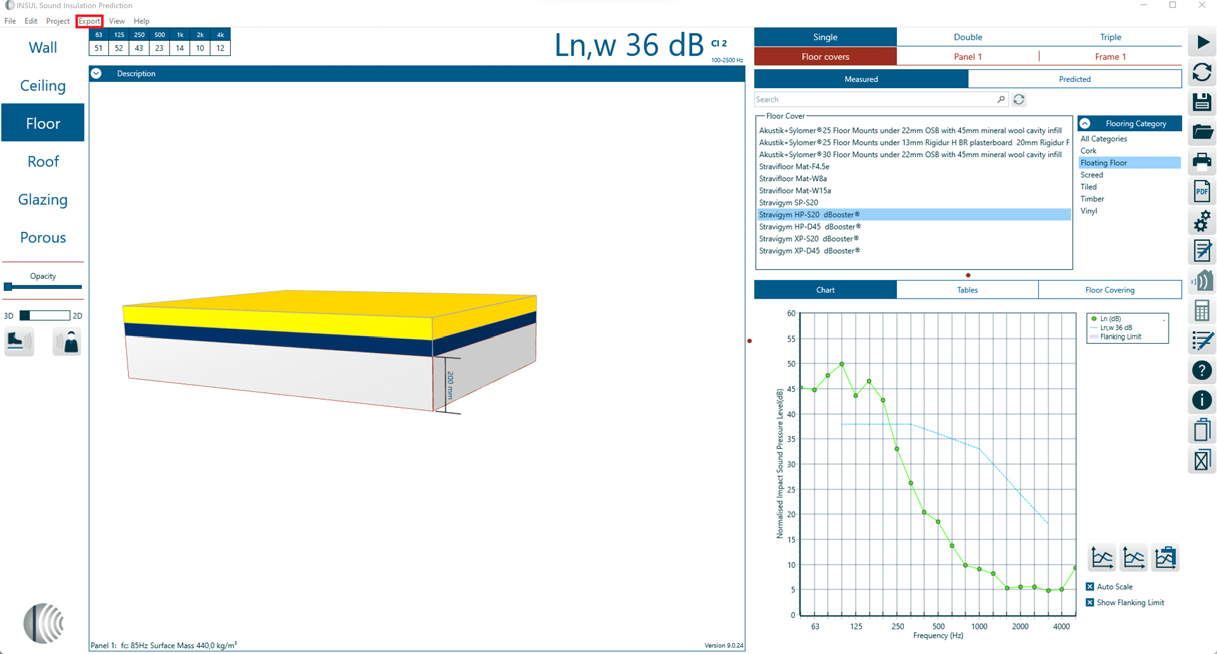
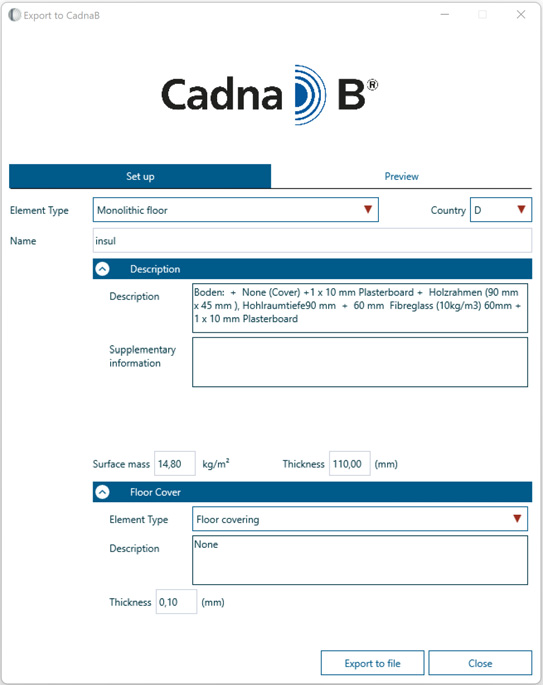
Selecting CadnaB via Export opens the dialog "Export to CadnaB" in INSUL. Depending on the type of component, the dialog differs slightly. In this dialog settings and entries can be made, which will be taken over directly into the construction information during the import to CadnaB. The "Export to file" button can be used to choose the storage location of the *.xml file.
Import to CadnaB
Via "Import" button in the construction data dialog in CadnaB the data exported from INSUL can be loaded. The information entered in the "Export to CadnaB" dialog in INSUL will be transferred to the construction data dialog in CadnaB and can still be adjusted after the import in CadnaB.
Notes on INSUL Export / CadnaB Import
- Linings modeled in INSUL to reduce airborne sound transmission are not considered separately in CadnaB, but directly assigned to the sound reduction index of the imported construction. A sound reduction improvement index ∆R by a lining is not specified separately in the sub-constructions.
- The normalized impact sound pressure level Ln and the sound reduction index R can only be transmitted separately.
- In CadnaB, a ceiling/floor construction can be assigned an Ln and an R from INSUL projects. For this purpose, two exports must be performed from INSUL, once for a ceiling (sound reduction index R) and once for a floor (normalized impact sound pressure level Ln. In CadnaB the INSUL data sets can be imported one after the other for the same CadnaB construction. Make sure that "Add spectrum" is selected for the second import.
- When importing "Floor", the flooring can be imported separately from the solid component/ceiling structure as improvement of impact sound insolation ∆L. If the "floor" is imported as a whole, the floor covering with its improvement of impact sound insolation is already included in the normalized impact sound pressure level Ln.