User defined vibration reduction index
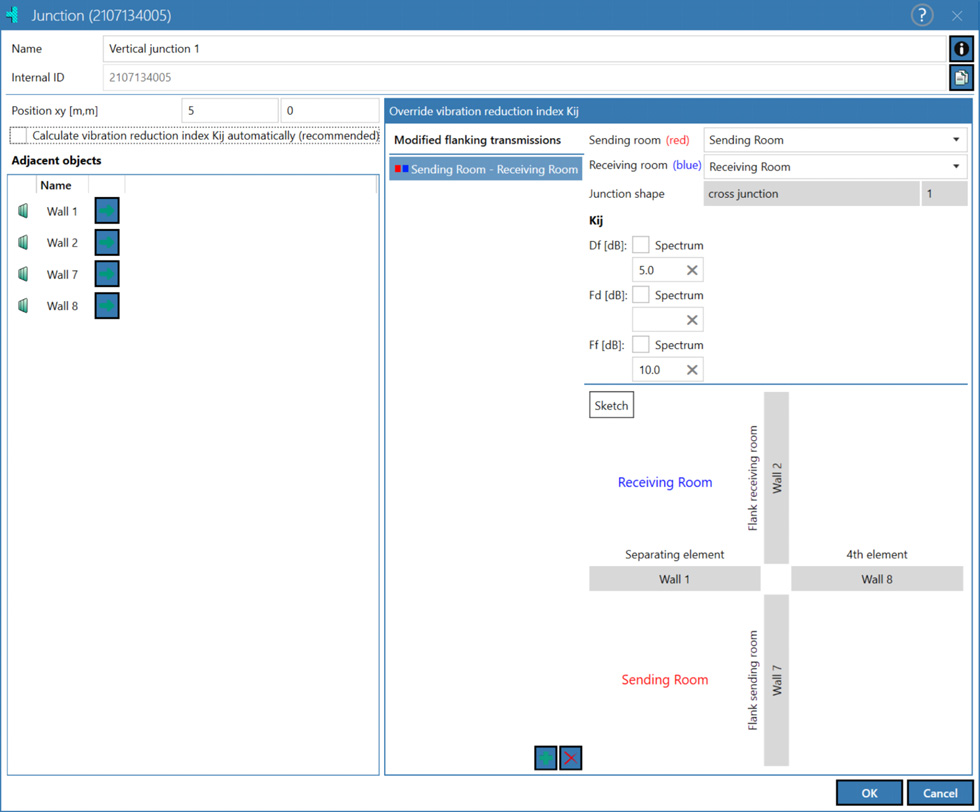
The junction dialog is adjusted by deactivating the option "Calculate vibration reduction index Kij automatically (recommended)". On the right side of the dialog there are the setting options for the manual input of the vibration reduction index Kij. As soon as a user defined Kij for an flanking transmission exists for a junction, the junction is marked with an exclamation mark  in the tables. If user defined vibration reduction indexes are applied, junction type no. 999 is output (see Junction Types). Junctions between walls with a user defined vibration reduction index are highlighted in orange in the 2D view. For the calculation of the flanking transmission when using user defined vibration reduction indexes, the construction data of the walls/ceilings located in the considered flank as well as the user defined vibration reduction index are used. If „no entry“ is made in a modified flanking transmission for Kij, the respective path is neglected in the calculation (see section Input of the vibration reduction indexes).
Dialog options
Modified flanking transmission
The column lists all modified flanking transmissions or still/again undefined flanking transmissions. For the respective junction, only modified flanking transmissions listed are considered, all other flanking transmissions over this junction are calculated using the method described in Automatic assignment of Junction Types. Entries can be created via the "plus" symbol and deleted via the "cross" symbol. A valid entry must always be assigned a receiving room and a sending room/outside. The boxes in front of the names of the room pair behave as in the Results mode see „Results“ Mode. The list of available rooms is filtered based on the selection already made and the rooms that are adjacent to the junction.
Input of the vibration reduction indexes
The vibration reduction index can be manually entered either as a single-number value or as a spectral dataset. For a flank with a typical junction, up to three vibration reduction indices \(K_{ij}\) can be specified, either as single-number values or as a spectrum. By activating the “Spectrum” checkbox, the input mode switches automatically from single-number to spectral input. Both types of input — single-number and spectral — can be used simultaneously at a junction. Spectral data can also be conveniently entered via copy and paste (Ctrl + v). The user-defined vibration reduction index in CadnaB is defined for single-number inputs within the range [-20; 40], for spectral data, no restrictions apply. User defined junction reduction indexes outside the interval are automatically corrected to the interval limits. "no entry" means that the respective flanking transmission is not calculated. Resetting an entry to "no entry" is done via the cross symbol next to the Kij input fields. It should be noted that \(K_{ij}=0\) is a valid entry for a vibration reduction index and does not correspond to "no entry".
The designation of the flanks with Df, Fd and Ff is in conformity with the standards. The letter "f" stands for a flanking component, the letter "d" for the separating component. Uppercase letters indicate the excited component in the sending room, lowercase letters indicate the radiating component in the receiving room.
Sketch
The sketch shows the sending room (red), the receiving room (blue), the separating component and components connected to the selected junction with their respective names.
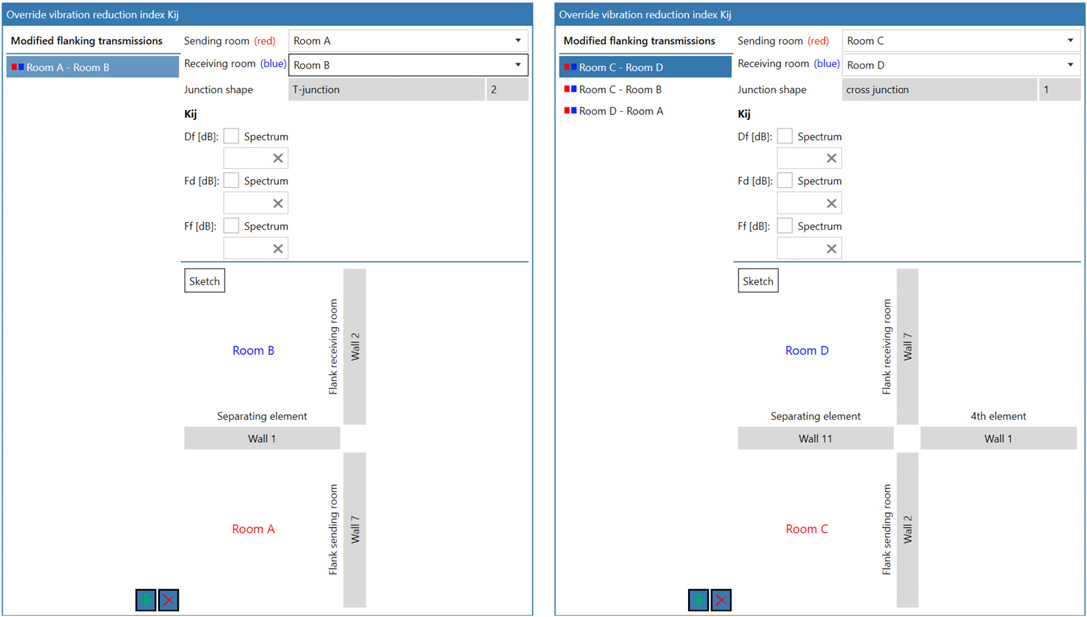
Left picture: T-junction, SR: Room A, RR: Room B; Right picture: Cross-junction, SR: Room C, RR: Room D
In the sketch, regardless of the actual modeling, the sending room is always shown at the bottom left and the receiving room is always shown at the top left. The separating component is always located between the sending room and the receiver room. At the junction, as can be seen in the above pictures, only the components that are in contact with the junction are displayed.
Edge conditions/Limitations on use
- Flank paths (Df, Fd, Ff) with "no entry" for the Kij are neglected in the calculation.
- Flank paths (Df, Fd, Ff) in which a decoupling is located are not calculated (see section Dialog part "Junction connection type"). The user defined Kij is grayed out in the dialog and set to "no entry".
- Flexible interlayers are neglected for modified flanking transmissions (see section Dialog part "Junction connection type").
- User defined vibration reduction indexes cannot be used for junctions where only one or two components are in contact with each other.
- User defined vibration reduction indexes cannot be used in a flanking transmission in combination with Dnf/Lnf inputs.
- For vertical room pairs, only the room on the active floor can be defined as the sending room at a time. To define the user defined vibration reduction indexes, where the currently selected room is to serve as the receiving room, you must switch to the floor where the sending room is located.
- The spectral input of vibration reduction indices is only possible with the ISO12354 calculation standard.
- ISO12354: User defined vibration reduction indexes cannot be used in the special procedure "Calculate impact noise from bottom-up (not according to standard)".
- ISO12354: For user-defined Kij inputs, CadnaB performs a comparison with the minimum vibration reduction index Kij,min.
- DIN4109: Junctions where the separating component, the sending room component and the receiver room component have a lightweight construction (without Dn,f,w specification) are neglected in the calculation even in connection with user-defined junction vibration reduction indexes.
- DIN4109: Junctions with lightweight components (without the specification of a Dnf) are calculated like massive junctions using the user defined Kij.
- DIN4109: For user defined vibration reduction index inputs, CadnaB neglects the adjustment with the minimum vibration reduction index Kij,min
Note
In the results dialog, the message "At least one user defined Kij used" is displayed when a user defined vibration reduction index is applied.
Note
The function of "user defined vibration reduction index" is not available in CadnaB Demo version.