Control Elements
Option Button

Option buttons are control elements indicating whether a condition is true or false. If true = yes, a black dot appears in the option button. The mouse pointer is used for activation/deactivation. Within one set of options, only one option can be active at one time.
Check Box

Check boxes are control elements indicating whether a condition is true or false. When the checkbox is activated, a tick mark appears in the square, indicating that the condition is true (active). Otherwise, the condition is false (inactive). Within one set of options, multiple options can be active at one time.
List Box/Combo Box
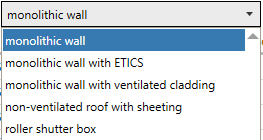
A list box contains a list of available items only one of which can apply. The item selected will be displayed on the list box. In a combo box, either an item can be selected or a value be entered. In order to open the list, click the arrow to the right of the box.