Dialog Result Table
The result table with its filter functions is an important tool in CadnaB. The dialog is only available in the Results mode and can be accessed via the menu Tables | Result table. By activating the option Open result table after calculation via Extras | CadnaB Settings the results table will be opened automatically after each calculation.
Dialog result table
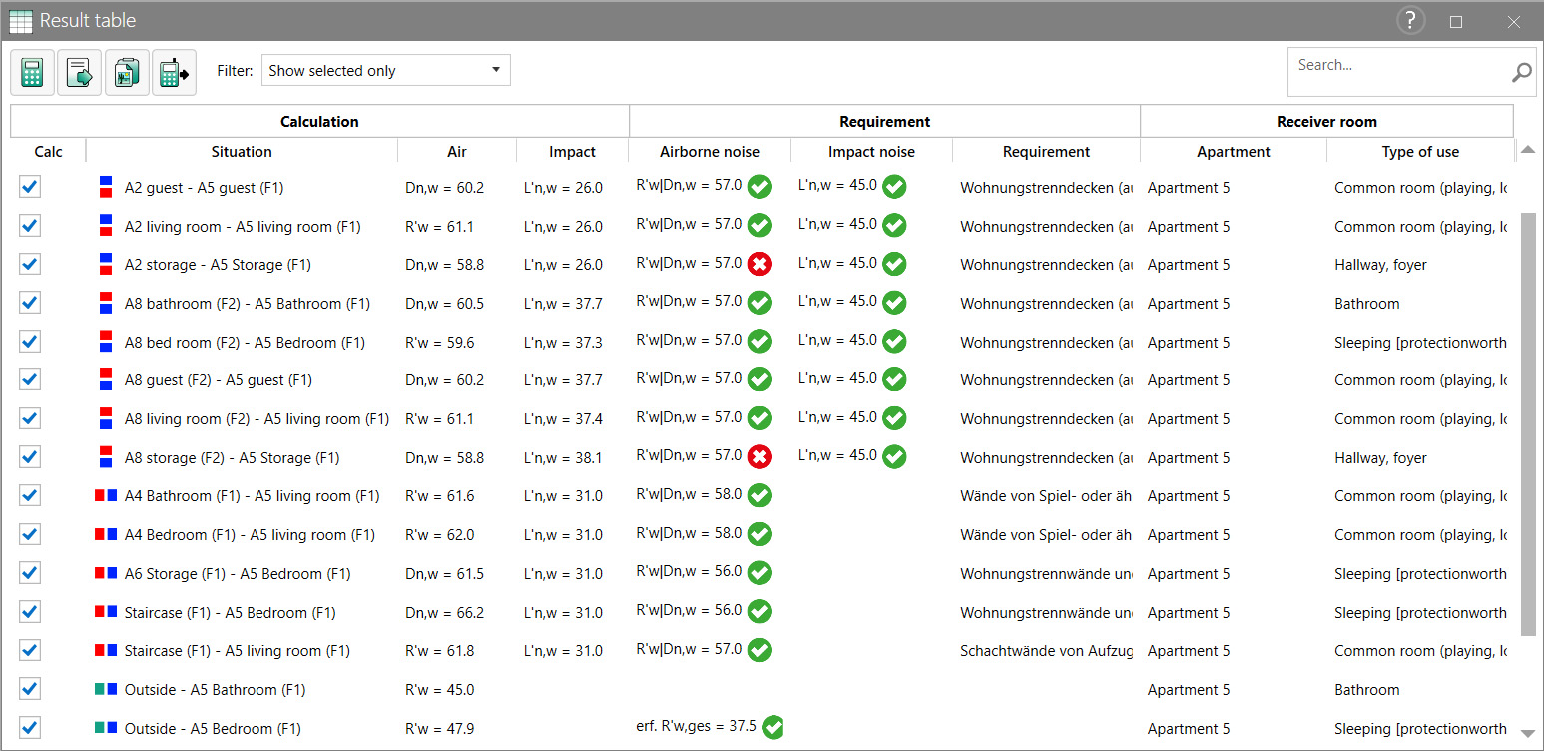
Table content
Each row of the table represents a transmission situation. The table is divided into the three main columns Calculation, Requirement and Receiver room and in the following sub columns:
Calculation
- Calc: A checkbox that marks if the situation should be considered in the calculation or not. The activation status can be changed with a mouse click on the checkbox.
- Situation: The room pair and its position are displayed here. The position is shown by the arrangement of the red and blue boxes. (red box - sending room; blue box - receiving room).
- Air: Result output for the airborne sound calculation with the respective evaluation parameter.
- Impact: Result output for the impact sound calculation with the respective evaluation parameter.
Requirement
- Airborne noise: Output of the requirement for airborne sound transmission with the respective evaluation parameter.
- Impact noise: Output of the requirement for impact sound transmission with the respective evaluation parameter.
- Requirement: Name of the selected requirement
Note
The meaning of the green, red and orange symbol is explained in „Results“ Mode.
Receiver room
- Apartment: Display of the apartment of the receiver room.
- Type of use: Display of the use of the receiver room.
Icons
Clicking on the icons will perform the associated actions.
-
Via the icon
 \(-\) the calculation can be started.
 -
Via the icon
 \(-\) a *.csv file of the current results table can be exported.
 -
Via the icon
 \(-\) the data of the current results table can be copied to the clipboard.
 -
Via the icon
 \(-\) the dialog for the calculation presets (see Dialog Calculation Presets) can be opened.
Filter
In the Result table, the following filters can be applied to the list of transmission situations:
Show all: All transmission situations are displayed regardless of their activation state.
Show selected only: Only the activated transmission situations are displayed.
Worst Case: The following are selected from the list of activated transfer situations:
- The room pair, which has lowest value for airborne sound insulation vertically.
- The room pair, which has the largest value for impact sound vertically.
- The room pair, which has the lowest value for airborne sound insulation horizontally.
- The room pair, which has the largest value for impact sound horizontally.
- ISO 12354-2017, Teil 1-3: The room whose façade components have the lowest airborne sound insulation.
- DIN 4109:2018: ~ only available in German - The selection is made depending on the requirement!
Note
If two criteria apply to one room pair, only one room pair is displayed.
Output for the DEGA 103 sound insulation certificate
Only available in German