Dialog Calculation Presets
The calculation presets can be used to preselect the room pairs/transmission situations to be calculated. In the dialog there are different selection options for the whole building as well as for single apartments. By confirming, a calculation with the selected calculation preset is started.
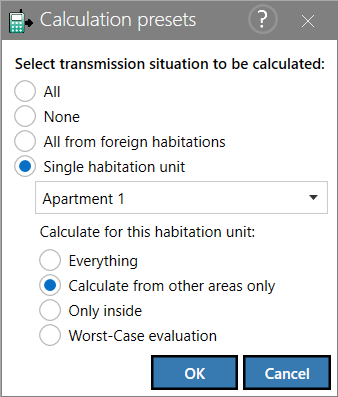
Selection Options
The first three radio buttons are for the whole building. As soon as an apartement is selected in the drop-down list of "Single habitation unit", the options for an habitation unit are unlocked.
- All: All transmission situations are activated for the calculation.
- None: All transmission situations are deactivated for the calculation.
- All form foreign habitations: All situations are activated in which the sending room is located in a foreign area opposite the receiving room. Foreign areas here are other apartments, areas without apartment assignment and outdoor areas.
- Single habitation unit: The selection activates the drop-down list, through which an habitation unit can be selected from the available apartments. The following actions can be selected for the chosen apartment.
- Everything: All transmission situations for the selected habitation unit are activated.
- Calculate from other areas only: All situations are activated, in which the transmitter room is located in a foreign area to the selected habitation unit.
- Only inside: All situations are activated in which the sending room and the receiving room are located in the selected habitation.
- Worst-Case evaluation: All situations are activated, in which the sending room is located in a foreign area to the selected habitation. In addition, the filter Worst-Case is set in the result table (Filter).