Apartment
The object "Apartment" offers the option to assign different rooms to a single apartment. By selecting one or more apartments in the list box of the "Project" mode, an outline of the apartments is shown in the 2D-display. The assignment of rooms to apartments can be realized via the "Room/habitation assignment" dialog (see Room/habitation Assignment).
In addition, individual rooms can be assigned to apartments via the dialog „Room“, see Room. Through Grouping rooms into apartments allows calculations to be performed specifically for apartments and filter functions to be applied (see Dialog Result Table). When using automatic requirements detection, apartment assignment is essential (Automatic requirements detection).
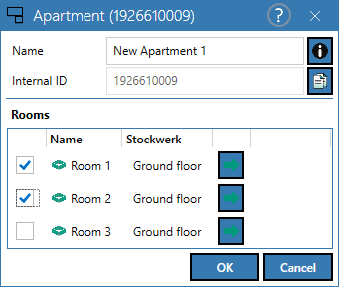
Dialog options
- Name, Memo-field
 , Internal ID: see Common Input Data
 - „Rooms" table: displays the rooms currently assigned to this apartment followed by all rooms that are currently not assigned to any apartment. The assignment can be changed with the checkbox next to each room. Clicking on a room highlights the corresponding object in the object list and in the 2D view.
After clicking on the green arrow  in the last column, the corresponding room dialog (see Room) is opened.