Start Auralization
In CadnaB, the result of the calculation can be made audible with the help of binaural auralization. This allows the user to imagine the effect of a constructional measure. For this purpose, a source in the form of an audio file is simulated in the sending room or in front of the façade, which is then reduced by the calculated sound reduction index.
Note
Auralization is only available for spectral airborne sound transmission!
Symbol bar
In addition to the menu entry, auralization is also available via the corresponding icon  in the symbol bar (see Symbol Bar). Clicking on the icon starts the recalculation of the model and opens the auralization dialog.
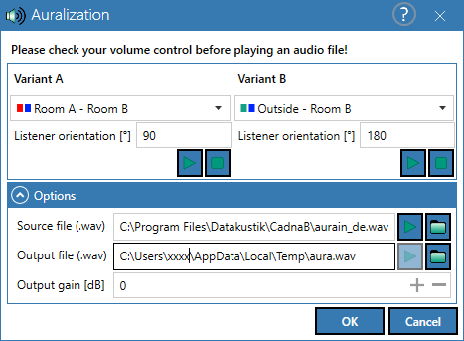
Dialog options
Variant comparison
Variant A and B allows the comparison of two room situations. For selection, only room pairs with a valid airborne sound result are displayed in the selection list.
Listener orientation
The orientation of the listener in degrees. 0 degree refers to the positive x-direction (right). Positive values refer to counterclockwise direction. CadnaB initializes this value with direction to the center of the first separating element.
Buttons


For calculating/playing and stopping the audio file:
- Source file: A WAV audio file (ideally 44.1 kHz) representing the source signal in the sending room. CadnaB provides a sample file in the installation directory.
- Output file: Clicking the Play button creates a new WAV file and writes it to this directory. The path points to the user's TEMP directory by default.
- Volume adjustment "Gain": Positive value in decibels, which amplifies the output signal. Useful to make transmissions with a high sound reduction index for the separating element still audible, but can lead to an overdrive of the signal. Default 0dB means no amplification.
Receiver room type
Selection of a room type to consider spatial response in the receiving room.
Background
The principle of binaural auralization is based on the so-called HRTF ("head related transfer function"). This function is used to simulate the screening of the head-shoulder area, as well as the shape of the auricles for each ear. These HRTF pairs (left and right ear) are specific to each position in the room and, in fact, to each listener. Here, however, an artificial head was taken as a model. Using a Fast Fourier Transform (FFT), each input signal can be convolved with the HRTF pair so that it sounds to the listener as if it is coming from a specific direction. This creates the spatial auditory impression at the end.
In CadnaB this technique is applied to each signal attenuated by a component (sorting: receiving room) and accumulated at the end, allowing the listener to perceive different attenuations of components spatially as well. The attenuation of a signal by a component (in the respective frequency bands) is thus a preceding step for the actual binaural auralization.
Summary
Each component provides a attenuated signal (based on the source file), which is binaurally synthesized by means of corresponding HRTF pairs, depending on the geometry. All binaural signals are accumulated at the end to a stereo signal, which is stored in the output file.