Calculating Room-to-Room Transmission
After one or more CadnaB projects have been created (see Managing CadnaR Projects) and the corresponding surface properties have been edited, open the Remote job dispatcher dialog (Start CadnaR calculation command in the Calculation menu).
Select the “Room-to-Room transmission” option as the type of calculation. The dialog shows a list of all existing CadnaR projects, the type of calculation, the calculation task, their respective status and any error messages that may have occurred after a calculation.
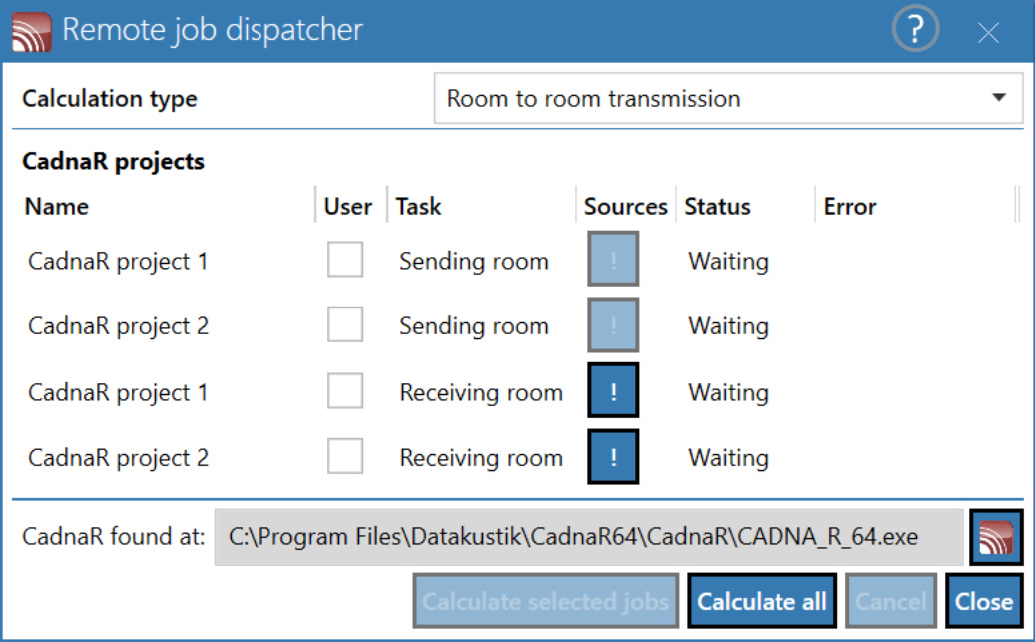
The dialog can be used to select which of the existing rooms are to be used as sending and/or receiving rooms when calculating the transmission from room to room. Additionally, the „!“ sign for each line allows to select which source types (room-to-room, outside-to-room, exisiting CadnaR to room) should be considered in the calculation.
For the further procedure and a detailed example, see Calculating Room-to-Room Transmission.
Calculate selected tasks
After selecting one or more projects, these are calculated. As usual, the SHIFT and CTRL keys can be used for multiple selections.
Calculate all
calculates all existing CadnaR projects
In both cases, the "Calculate" entry in the "Status" column shows which project is currently being calculated.
CadnaR detected at
shows the file path of the CadnaR version used for calculation
Additional Information
The calculation of the transmission (i.e. the level in the receiving room) is based on the sound reduction index R‘ calculated in CadnaB for each room pair „sending-receiving room“, i.e. including the flanking transmission modeled in CadnaB.
If windows/doors or small elements are inserted into the separating wall, their sound reduction index R is taken into account as a separate source on the receiving side. This means that the location of these elements within the separating element is considered and is relevant for the local level in the receiving room.
The calculation in CadnaR is done spectrally, however, according to CadnaB, only the A-weighted sound level in the receiving room is transferred. If the reception spectrum is required in individual cases, the project file must be opened in CadnaR and the spectrum evaluated there at the respective receiver.
The actual calculation in CadnaR occurs in three steps:
-
In the sending room, an areal distribution of receivers is generated on the separating element‘s surface on the sending side. Inserted windows/doors or small components are considered separately (see above). The A-weighted sound pressure levels at these receivers are calculated by CadnaR.
-
In the receiving room, a similar two-dimensional distribution of point sources is generated on the separating element‘s surface on the receiving side. The sound power of these virtual point sources results from the difference between the SR-side A-weighted level and the sound reduction index R‘w or Rw. The software ensures that the same segmentation on the sending and the receiving side is applied.
-
Based on this source distribution on the separating element‘s surface on the receiving room side, the receiver levels or calculation areas are calculated by CadnaR. Provided the option "Show background bitmap" is activated, the result is displayed as a bitmap background in the CadnaB project.