CadnaR Project
The CadnaR project dialog enables the selection of the surface properties for the selected room. This information is required in the subsequent calculation using CadnaR in order to be able to calculate reverberation times or room levels.
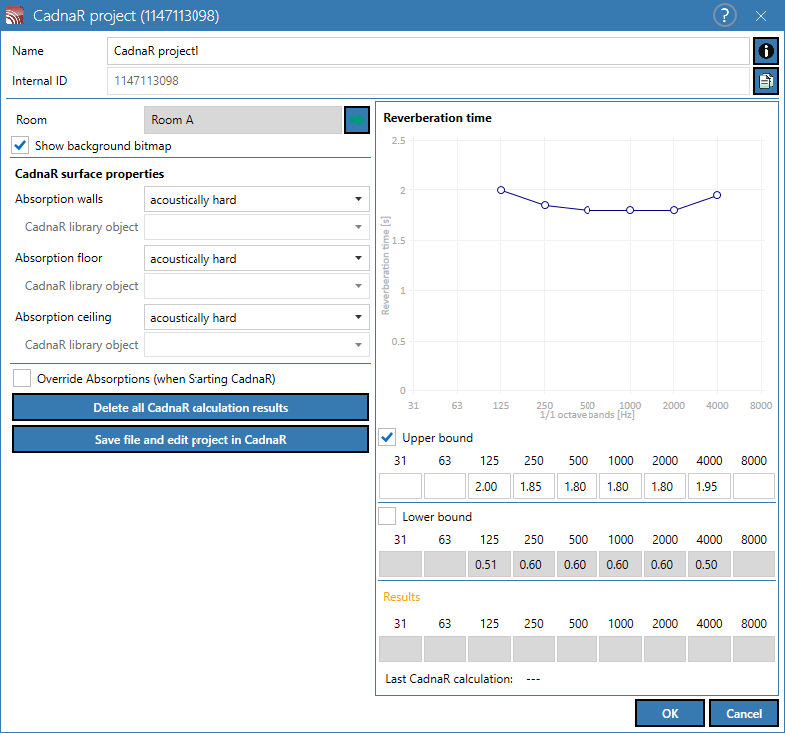
In this dialog, the surface properties (absorptions) of the walls, floor and ceiling of the relevant room can be edited. In addition, both upper and lower limits of the reverberation time can be defined. After the calculation in CadnaR, the calculation result is also displayed in this dialog.
Dialog options
- Name, Memo-field
 , Internal ID: see Common Input Data
 - Room: CadnaB room name
- Clicking the green arrow
 displays the dialog Room (see Room).
- Clicking the green arrow
Option „Display Background Bitmap“
If the option is activated, the representation of the room in CadnaR - including all existing objects such as sources, barriers, grids, text boxes/labels - is displayed as a bitmap in CadnaB after the calculation.
CadnaR Interface Properties
In this part of the dialog, the sound-absorbing properties can be selected for walls/floor/ceiling of the currently selected room. The following predefined selection options are available by default:
- rigid
- carpet
- acoustic ceiling
- absorbing
- highly absorbing
- User-defined: By this selection, the installed CadnaR application can use the additional selection list “CadnaR library object” to access its library “Absorptions (global)” (specifically not the local absorptions).In the course of calculation, CadnaR performs a search in three steps, searching for the absorption spectra assigned by an ID (in the sequence local/global/default “Absorptions” libraries).
The stored absorption spectra of the predefined properties can be found in CadnaR at Tables |Absorptions (global). The corresponding IDs start with "DefAbsInterop_*".
Option „Overwrite Absorptions“
If the option is activated, any previously exported absorptions will be overwritten during the next calculation in CadnaR. If deactivated, any previously exported absorptions are retained.
Button „Delete all CadnaR Calculation results“
deletes all CadnaR calculation results from previous calculation runs (to reduce the file size). The CadnaB file will be saved simultaneously.
Button „Save file and edit project in CadnaR“
CadnaR projects created in CadnaB, which only serve to calculate the reverberation time based on the absorption of the room boundary surfaces (floor /walls/ceiling), do not have to be edited subsequently in CadnaR. The receivers required for the calculation to calculate the spatially averaged reverberation time are temporarily generated in CadnaR during runtime and deleted after the calculation has been completed.
This button, which enables the subsequent editing of a project in CadnaR, is therefore primarily required in the following cases:
Calculation Type „Reverberation Time“
- calculation type „Reverberation Time“ (see Calculating Reverberation Time):
- If, in addition to the room delimitation areas (floor/walls/ceiling), other absorption areas - for example in the room - must be taken into account. These cannot be entered directly in CadnaB, but require editing of the project in CadnaR.
- With complex room geometries (e.g. rooms with numerous wall contours protruding and receding into the room volume), it may be necessary to manually place the receivers required for the reverberation time calculation.
In such cases, click this button and enter a file name in the Save As dialog. Then CadnaR is started and the exported data is loaded. Enter the additional absorbers (e.g. as screens, obstacle blocks or 3D poly meshes) and / or immission points. Then save the file in CadnaR and close CadnaR. The data are automatically transferred to the currently open CadnaB project.
Then start the calculation of the reverberation time (see Calculating Reverberation Time).
Calculation Type „Room-to-Room“
- calculation type „Room-to-Room“: (see Calculating Room-to-Room Transmission): With this type of calculation, the exported project must always be edited in CadnaR in order to enter the objects additionally required for the calculation in CadnaR. These are in detail:
- a sound source per sending room (at least one, but several possible) and
- one receiver per receiving room (at least one, but several possible).
To do this, click this button and enter a file name in the Save As dialog. Then CadnaR is started and the exported data is loaded. Enter at least one sound source per sending room and one receiver per receiving room. Then save the file in CadnaR and close CadnaR. The data are automatically transferred to the currently open CadnaB project. Then start the calculation of the „Room-to-Rom" transmission (see Calculating Room-to-Room Transmission).
Dialog Section Reverberation Time
- Upper/lower limit: For the current room, an upper and, if necessary, a lower limit in octave bandwidth of the reverberation time (in s) can be defined. Input boxes without an input value are ignored in the check. The defined limits are displayed in the reverberation time diagram.
- Results: After the calculation in CadnaR, the values of the reverberation time (in s) are displayed in octave bandwidth and at the same time as a curve in the diagram.
The values in the individual octaves can also be read in the diagram by crossing the points with the mouse pointer.
- Last CadnaR calculation: shows the date and time of the last calculation in CadnaR
Additional Information
The sound-absorbing properties of walls/floor/ceiling selected/defined in CadnaB are mapped in CadnaR by using the objects „Barrier“ (for walls) and „PolyMesh“ (for floor/ceiling), and not via the room surfaces edited in the Room dialog in CadnaR).
A CadnaR project generated in CadnaB is saved within the CadnaB file (embedded in *.cnb) and also loaded as such into CadnaR and saved from there as a cnb file. The relevant data is then loaded into CadnaB.