Section
This object has no acoustical relevance. A section can be used
- to copy objects inside a section to the clipboard (see CadnaA manual "Attributes, Variables, and Keywords"). In this case, the section has to be marked.
- to print objects inside a section. This requires to enter a name for the section (see Print Graphics).
- to modify objects (see CadnaA-manual "Attributes, Variables, and Keywords").
- to import objects just laying inside an existing section (see Import only Section).
- to calculate in the PCSP mode (see PCSP - Program Controlled Segmented Processing).
Rotate Section
The section can be rotated by entering an angle. For the print out or copy of the rotated section the output of the section area will be transformed by that angle.
The margin of the section is neither printed nor copied. You can insert a text in the field description which can be printed via the PlotDesigner. In this case use the keyword #(Range, Parm1, Parm2) either in a text box directly in the file or in a text cell in the PlotDesigner (keywords see CadnaA manual "Attributes, Variables & Keywords").
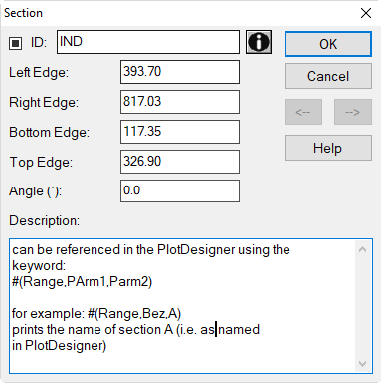
The number of sections in a project is not limited. These are listed with their names and coordinates on menu Tables|Other Objects|Section.