Calculation Protocol
The calculation protocol (Calculation|Protocol dialog) for receiver points is generated during calculation and requires, therefore, to recalculate the levels at receivers after activating this option (via the symbol  on the symbol bar).
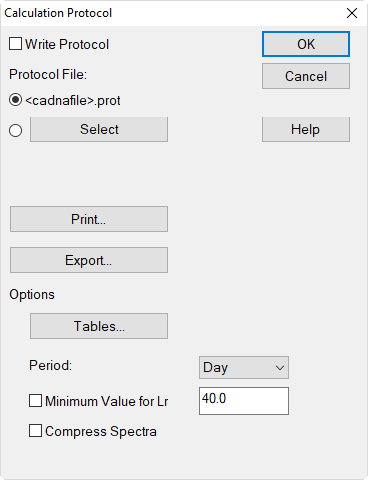
The calculation protocol shows the relevant sound power levels (Lw resp. L‘w), the attenuations, and the receiver levels (Lr) for each ray path for the time periods Day, Evening and/or Night. Note that there no protocol exists for mixed receiver levels (e.g Lde or Lden). These mixed levels are calculated from the levels Ld, Le and Ln afterwards (including the entered penalties, if any). Furthermore, the protocol is not available for rays that are generated solely through a calculation of the maximum level (evaluation parameter LmaxD/E/N).
Dialog options
Option „Write Protocol“
With the option „Write Protocol“ activated all intermediate results calculated at receivers (see Receiver) are written to a protocol file upon recalculation.
Protocol File
The data generated by using the protocol function is stored in a separate file, which is an SQLite database and can be read, for example, using the software DB Browser for SQLite.
When selecting <cadnafile>.prot, the same directory and file name as the .cna file are used, but with the extension .cnaprot. Alternatively, a user-defined path can be specified. If no CadnaA file has been saved yet, CadnaA uses a temporary directory, such as AppData/Local/Temp, to save the file.
Button „Print“
By clicking the „Print“ button in the Print|Protocol dialog is opened enabling to specify the printer settings and the page layout (check for the analogous options in the Print Report dialog, see Printing Reports). Furthermore, with the "Print Range" setting, a selection of the receivers can be made.
- Use the „Preview“ button to display the selected paragraphs on the CadnaA Print Preview dialog (see Print Preview).
- Clicking the „Print“ button will start to print via the selected printer immediately.
Button „Export“
Clicking the „Export“ button enables to export the protocol file in text or html format. To this end, specify a filename and select a directory. By clicking „Save“ the protocol file is exported using the currently set table columns. The exported file can be opened with a text editor and be edit, if necessary. Html files can be opened and printed using a web browser.
This button is also used to export the compact protocol. For further information, see chapter Compact Protocol.
Options
Button „Tables“
Clicking this button opens a dialog enabling to edit the columns displayed on the protocol table.

The protocol has a predefined column structure for each calculation standard or guideline. The calculation standards displayed depend on the license and are divided into four columns for standards depending on source types industry, road, railway and aircraft noise. Click on a specific standard in order to display the corresponding predefined table format in the section „Preview“.
When clicking on Edit, a user-defined protocol table can be entered. For further information, see Editing Object Tables and see Protocol attributes.
Period
The selected time range determines whether the protocol is exported for all periods D/E/N or just for a specific period.
In case „(all)“ is selected, the protocol file lists separate rows for each time period D/E/N, provided the emission differs within each of the periods. When the emission is equal within all periods D/E/N, however, just a single protocol row using the string „DEN“ is displayed.
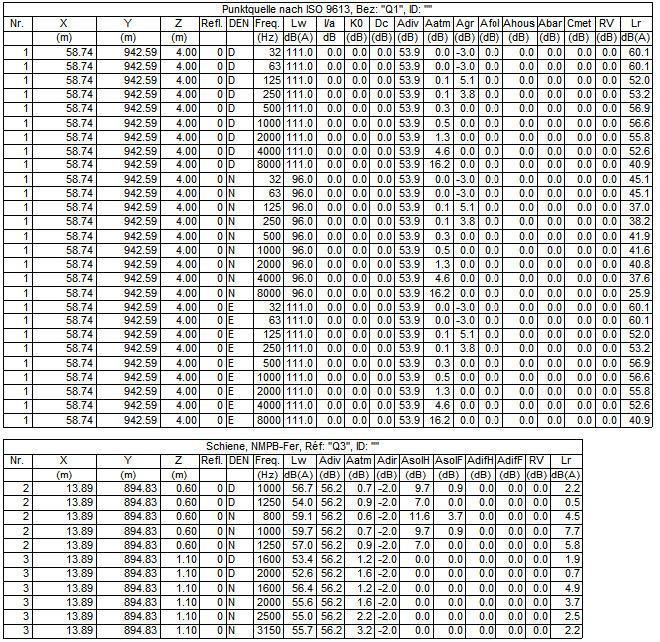 |
EXAMPLE 1: point source with the same emission time in periods D and E, but different emission in period N. In case option „(all)“ is selected, the protocol will show separate rows for each time period. For railway, separate rows for time periods are always displayed. NOTE: Option „minimum value for Lr: 0.0 dB“ ON |
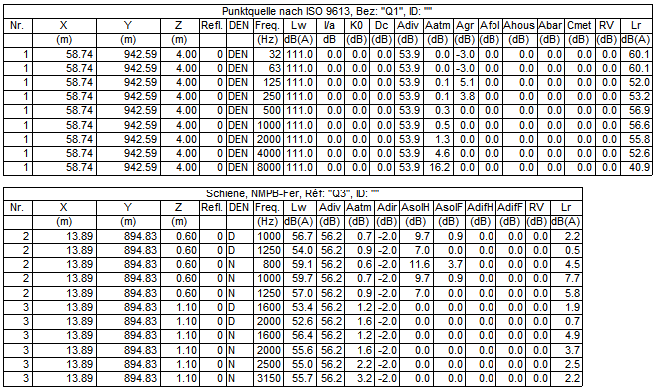 |
EXAMPLE 2: point source with the same emission in all time periods D/E/N. In case option „(all)“ is selected, the protocol will list lines marked by „DEN“ which apply to each of the time periods D/E/N. NOTE: Option "minimum value for Lr: 0.0 dB" A |
Option „Minimum Value for Lr“
By activating this option the protocol will just list those partial levels which are larger or equal to the entered value. For example, by specifying a minimum value of 0.0 dB no negative partial levels will be displayed.
Compress Spectra
When this option is inactive, a separate line is generated in the protocol for each frequency of spectral sources. When active, the spectra are instead compressed into a single line, with calculations based on the A-weighted level using appropriately weighted values for frequency-dependent attenuation terms.
see also: chapter Compact Protocol
Open protocol via ray
If the option Generate rays (as auxiliary polygons) is activated and the protocol has been calculated, a "Protocol" button is displayed in the edit dialog of a ray (auxiliary polygon, not receiver). This button allows viewing the protocol for the selected ray.
Column K0 for industrial sources (directivity index)
For industrial sources, the protocol shows the column K0. The displayed value depends on the configuration setting for option „Ground Absorption“ on the „Industry“ tab (see Industry Tab):
- For ground absorption models considering the increase in sound power level of the source due to ground reflections near the source within the ground absorption Aground, the column K0 just shows the value „K0 without ground“ as entered on the respective source dialog.An example is the spectral ground absorption model of ISO 9613-2 (in this example K0 = K0 without ground = 3 dB):This also applies to propagation models which do not consider ground reflections near the source at all or in a different way.

- For ground absorption models considering the increase in sound power level of the source due to ground reflections near the source separately (so, besides the pure ground absorption Aground), the column K0 shows the sum of the value „K0 without ground“ as entered on the respective source dialog and the calculated directivity index (e.g. K0 in VDI 2714, Domega in ISO 9613-2).An example is the non-spectral ground absorption model of ISO 9613-2 ISO-9613-1 (K0 = K0 without ground + Domega, in this example 3 dB + 2.9 dB = 5.9 dB):
