Search for Objects
Use this command to search within the entire data stock, to identify and retrieve objects for editing. When an object is found, it will be selected and displayed in the window. Pressing the RETURN key will open the relevant dialog. The Search dialog must remain opened.
The „Search Again“ button serves to start or continue the search procedure. Either one or an arbitrary combination of the attributes Object Type, Name and ID (see Dialog Options Name, ID, INFO, ObjectTree, Master) can be used to specify either all objects or each of the objects to be retrieved. If more than one criterion is given, all criteria (logical AND) have to be fulfilled (see Searching for Strings in the CadnaA-manual „Attributes, Variables, and Keywords“).
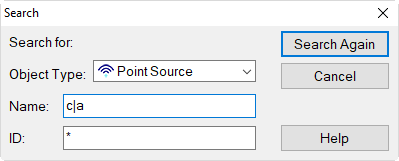
This input would search for a point source named either „a“ or „c
Use the list box to select the type of object. By selecting the option: ?(All) all kinds of objects are compared with the search criteria. Otherwise, only objects of the specified type are searched for. Wildcards can be used as usual, e.g. the asterisk (*).