Snap Point to Facade
This action on dialog Modify Objects or from the context menu enables to relocate objects (e.g. point, line or area source or receiver point etc.) at a defined distance in front of building facades after they have been inserted.
Distance Points-Facade
The objects are attached to the facade with this distance.
Snap Radius
The action is applied to all points with a distance smaller than the snap radius.
This action may apply in these situations:
- after objects have been inserted without activated Object Snap (see Object Snap) but shall have a defined distance to the facade
- in case objects have been placed inside a building, but shall be moved and located at a defined distance from the building‘s facade or
- when points have been imported from external sources
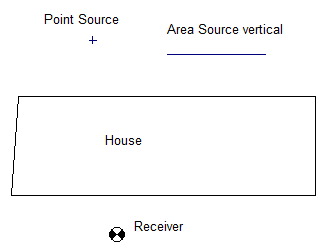
Initial situation: Building with a point source, a vertical area source and a receiver point. These objects shall be dragged in front of the facade with a distance of 0,05 m.
Example
Path: Examples\Obstacles\SnapePointFacade.cna
In the shown example objects are located near a building. The receiver point and the vertical area source shall be dragged to the building facade with a distance of 0,05 m.
- Click with the right mouse key into the white area of the screen.
- Select on dialog Modify Objects the action „Snap Point to Facade“.
- Mark the „vert. Area Source“ and the „Receiver“ as shown and confirm with OK.
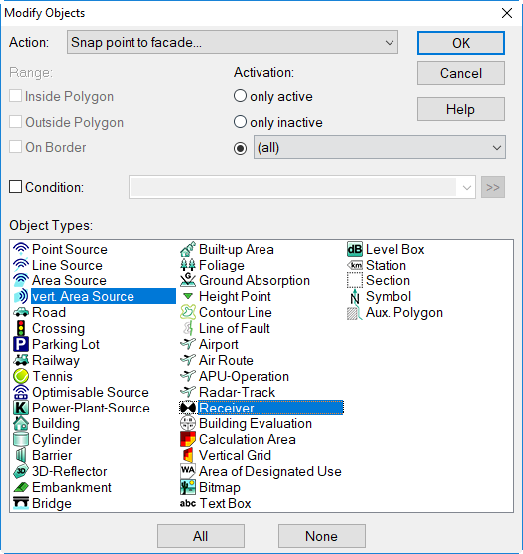
The receiver and the vertical area source are snapped to the building‘s facade.
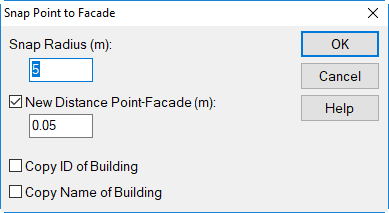
With activated options „Copy ID resp. Name“ of building the contents of these fields is copied into the corresponding fields of the objects snapped.