AutoCad DXF
DXF files can be imported to CAD software (e.g. AutoCAD by Autodesk Inc.). When clicking the „Options“ button the following settings are available.
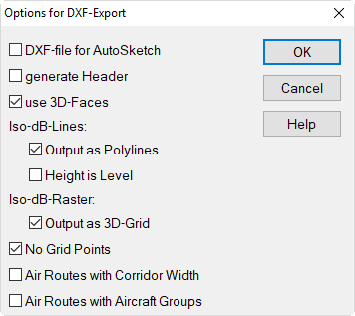
Options for DXF-Export
DXF-file for AutoSketch
When this option is deactivated DXF files generated match the specifications of CAD software (e.g. AutoCAD).
If this option is activated, AutoSketch compatible DXF files are generated with the following properties:
- no 3-D information
- layer identification for AutoSketch (for layers 1 to 10)
- no export of "complex" objects like 3D-FACE etc.
generate Header
A header will be written which enables the import the data into CAD software requiring a file header.
Use 3D-Faces
With this option activated, horizontal projections of buildings can be represented as 3D-views after having been exported to the CAD program.
Iso-dB-Lines
These options require that the grid appearance in menu Grid|Appearance is set to „Lines of Equal Sound Level“ or „Areas of Equal Sound Level“.
- Output as Polyline: When this option is activated lines or border-lines of equal sound level are exported as continuous polylines. If this option is deactivated, each section of the lines are exported as a distinct object.
- Height is Level: When this option is activated the sound level is exported as height (z coordinate). Otherwise the sound level is a characteristic of the DXF layer only and the height of the Iso-dB-Lines is zero.
Iso-dB-Raster
This option requires that the grid appearance on menu Grid|Appearance is set to „Raster“.
- Output as 3D-Grid: When this option is activated the level distributions exported as 3-dimensional terrain profile with the height representing the level.
No Grid Points
When this option is activated the grid points are not exported.
Air Routes with Corridor Width
see manual for option FLG
Air Routes with Aircraft Groups
see manual for option FLG