Variants
In addition to the generation of groups (see Groups) which already enable a flexible calculation and the display of different states of a project, the variants (menu Tables|Variant) offer further flexibility to handle several states of a project within a single project file.
For each variant it can be specified which of the existing groups - and thus all objects within that respective group - are activated or deactivated. For example, a variant may represent the present state of a project while a second variant represent a future planning situation. Upon calculation, the levels at all receivers, for all building evaluations and grids of all activated variants are calculated.
By default, the options „Save Grid per Variant“ and „Save partial levels per variant“ are enabled. Thus, the grids and the partial levels of all activated variants are saved. When switching variants the partial levels of the selected variant are displayed (e.g. via Receiver, see Partial Levels, or via Group dialog, see Groups, or on Partial Levels table via the Tables menu).
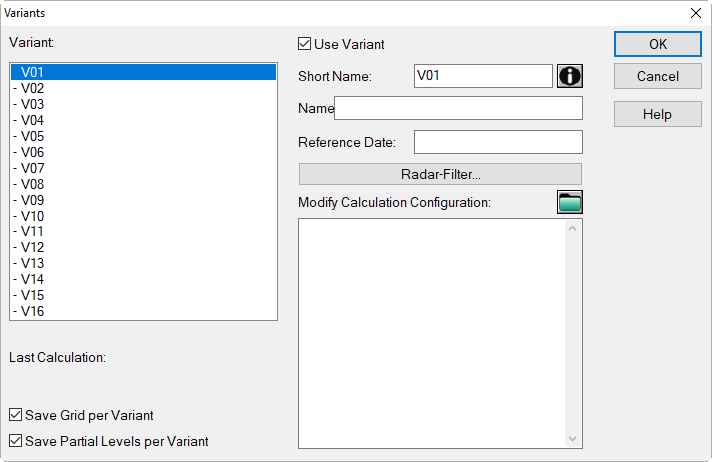
Dialog Variants
Dialog options
List of Variants
Up to 16 variants V01 to V16 are available in a single CadnaA file. When a short name or a name have been entered both will be displayed in this list in a row.
In the list, deactivated variants are indicated by a preceding minus sign.
Variants can be reordered using drag and drop. Any existing references to variants within the project are automatically adjusted accordingly. For example, if V01 and V02 are swapped, a label referencing the attribute LP1@V1 will automatically be updated to LP1@V2. These adjustments are made in CadnaA, including (but not limited to) the following functions:
- Activation state in the Tables | Group menu
- Object attributes per variant
- Calculation results (receiver, grid, partial level tables)
- Color palette per variant
- Radar filter
- Configuration of calculations per variant
- Object tables
- Result table
- Labels
- Select batch calculations
The following functions are excluded from automatic adjustments:
- Appearance menu, e.g., when using a condition like iif(BEZ@V1==1).
- Grid arithmetic
- Building noise map arithmetic
- Object Scan
- Excel import definition when using "Object attributes per variant"
Option „Use Variant“
This enables to specify whether a variant shall be activate or not in the present project. By default, just the variant V01 is active. The activated variants will be shown on the list box of variants on the toolbar:
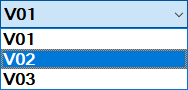
List box on the toolbar showing three variants
Double-clicking on the entry in the list (see above) also activates / deactivates the variant.
Short Name/Name
Enter, if necessary, a short name and/or a (long) name for the respective variant. The short name is displayed on the list box of the toolbar.
Reference Date
The reference date enables to include or exclude objects from the calculation. This requires that a date or a date interval is specified on the dialog Memo-Window of an object or objects (see Date Interval of Objects). For each variant a different date may be used.
Last Calculation
For each variant it is displayed when it‘s last calculation occurred (date and time).
Option „Save Grid per Variant“
By default, this option is active for all variants (V01..V16). In this case, the grid is saved for all active variants in the CadnaA file.
When this option is inactive, the grid will be calculated and saved only for the selected variant.
Regarding the grid calculation of variants see the Calculating Variants later in this chapter.
Option „Save partial levels per variant“
By default, this option is enabled. In this case, the partial levels at receivers (see Partial Levels) are calculated and saved for all active variants.
With this option deactivated, just the variant currently selected is calculated and saved.
Note
When opening files generated with releases of CadnaA prior to version 2020, this option is disabled by default.
Radar Filter
This button is available only when the CadnaA option RAD has been purchased.
See the specific CadnaA manual „Option FLG - Aircraft Noise Calculation“
Modify Calculation Configuration
In this input box, configuration settings specific to each variant can be defined, thus deviating from the general settings as set on dialog Calculation|Configuration. All parameters available for the keyword #(ObjAtt, CALCCONF, ...) may be used (see ObjAtt in the CadnaA manual „Attributes, Variables, and Keywords“, see parameter 2).
This feature can be used - for example - to perform the following tasks by using several variants within a project file:
- calculating the receiver level using different calculation standards or guidelines in each variant,
- calculation of different evaluation parameters and/or reference times and/or penalties in each variant,
- calculation of variants with a different „maximum error“ or search radius or order of reflection etc.
File Selector

The file selector symbol enables to load a configuration file (*.cnf, see Standards). After loading, the configuration changes compared with the current configuration are displayed in the „Modify Calculation Configuration“ box.
Example for manual modification
This example makes use of two variants. In the first variant, the calculation occurs according to ISO 9613. This standard is selected in the configuration, „Standards“ tab, for „Industry“. In variant V01, therefore, there is no deviation from the current configuration. An input for „Modify Calculation Configuration“ is not required.
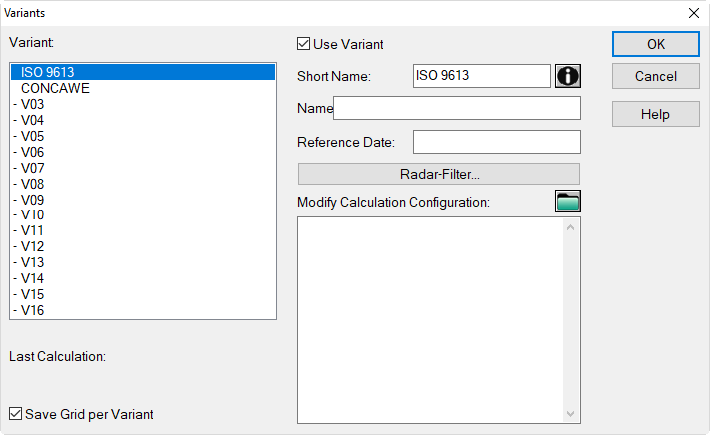 |
Variant V01: There is no deviation from the current configuration. Therefore, no input in box „Modify Calculation Configuration“ is required. |
By contrast, the calculation in variant V02 shall use CONCAWE procedure. Since ISO 9613 (1996) is selected in the configuration, this is a deviation and must be specified in input box „Modify Calculation Configuration“.
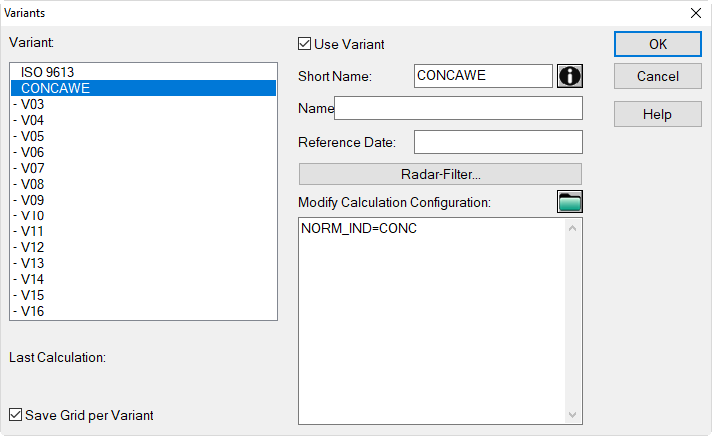 |
Variant V02: There is a deviation from the current configuration. An input in box „Modify Calculation Configuration“ is required is required, here: NORM_IND=CONC |
Progress Bar
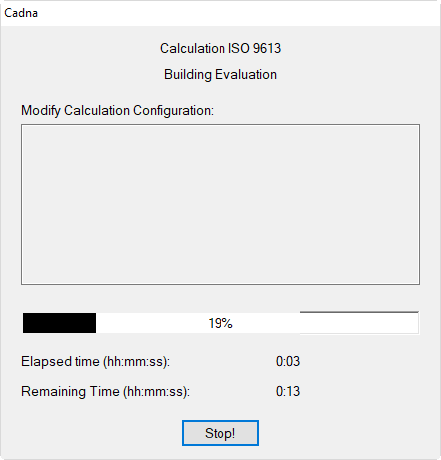
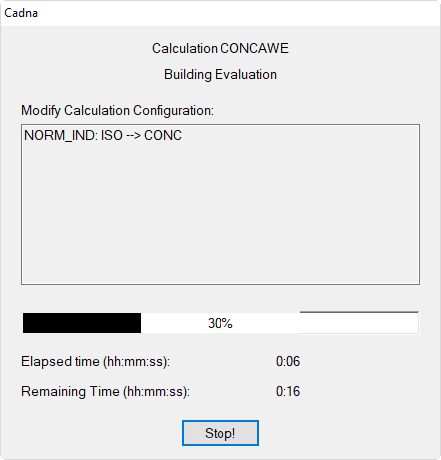
The deviations of the settings compared with the actual settings on the dialog Calculation|Configuration are listed on the dialog showing the progress bar.
Note that just deviations are listed. In case a parameter set has the same setting as already specified on dialog Calculation|Configuration, this will not be displayed, since it is not a deviation.
Note
In situations with a short calculation time, however, the dialog showing the progress bar, and thus a deviating configuration of calculation may not be displayed at all.
Example
 |
 |
| Variant V01: In the input box „Modify Calculation Configuration“ the calculation according to ISO 9613 (1996) for this variant was set (by the expression NORM_IND=ISO). Since this corresponds with the default setting on the dialog Calculation|Configuration, the dialog showing the progress bar displays no different configuration of calculation. |
Variant V02: In the input box „Modify Calculation Configuration“ the calculation according to CONCAWE for this variant was set (by the expression NORM_IND=CONC). Since this is a deviation from the default setting on dialog Calculation|Configuration (ISO 9613 (1996) selected), this deviation is displayed („ISO -> CONC“). |
Calculating Variants
By clicking the pocket calculator symbol  on the toolbar, receivers and building evaluations will be calculated. Using the symbol
  , the grid will be calculated. If more than a single variant is active, the following dialog is shown providing the option to calculate the current variant, all variants, or a user-defined selection of variants.
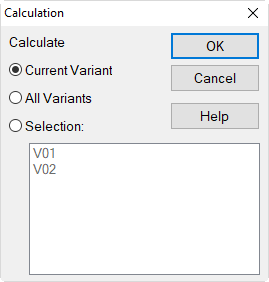
Dialog Calculation (Calculation menu)
The table Groups (Tables menu) just displays the results for the active (i.e. selected) variant when launching of the calculation, irrespective whether further or all variants have been calculated. The same holds for the table Partial Level (Tables menu) and for the table Partial Level selectable via the Receiver dialog.