Break into pieces
By the action „Break into Pieces“ on the dialog Modify Objects or on the context menu of a line-like object (e.g. road, line source, barrier) enables to subdivide an object into several objects of the same kind. All attributes of the original are copied to the pieces.
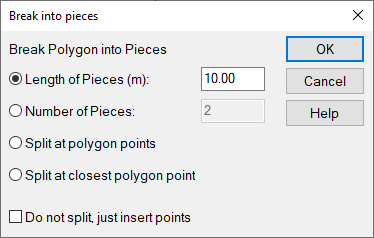
Options
- Length of Pieces: define the length of the new sections („pieces“). The last sections may have a shorter length, tough.
- Number of Pieces: The number determines based on the polygon‘s length the length of each section.
- Split at polygon points: The polygon is split using the present vortex points.
- Split at closest polygon point: When selected the active reference point is blinking. By clicking OK the polygon is broken at the point closest to that reference point.
Checkbox "Do not split, just insert points": Instead of splitting the polygon into separate objects, new polygon points are inserted.
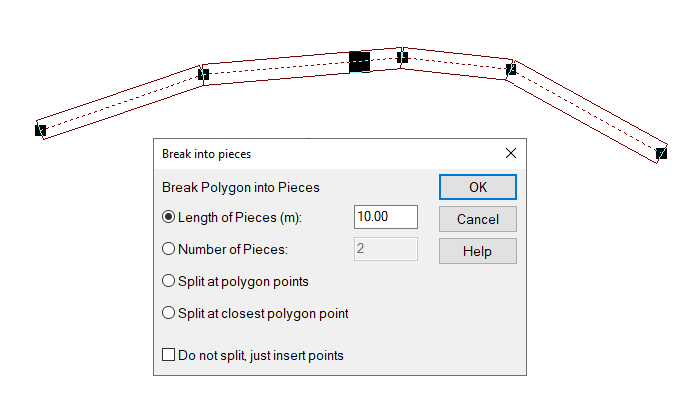
blinking reference point with option „Split at closest polygon point“
Example
The following example illustrates the effect when being applied to a road defined from two polygon points.
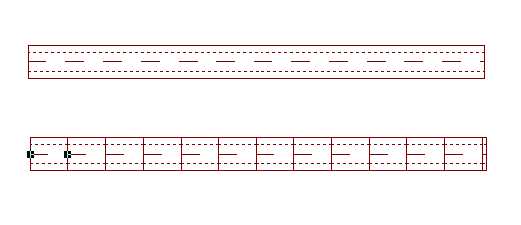
After having applied the command Break Lines to the road the road table (Tables menu/Sources/Road) lists a separate line for each new road segment - in this example 13 roads in 13 lines.
This command is also useful in conjunction with the CadnaA-feature Optimize Walls (see Wall Optimization).