Automatic Saving of Files
In CadnaA you can either save your work automatically at specified intervals, or have yourself reminded to save the file at specified intervals
For that, specify the desired option on the Options|Auto Save dialog. If no file name is specified under Automatic Backup in the file will be saved with filename autosave.cna to the present directory. For the filename keywords can be used.
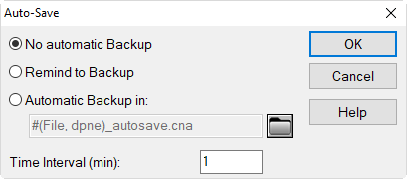
Dialog Auto-Save
When running CadnaA in batch mode (see Batch Operation) any selected auto save option will be deactivated.