Train Class Libraries
Global Library
The global library for train classes (via Tables|Libraries (global)| Train Classes) provides the emission data of various guideline-specific train classes with their parameters. This library is accessed when editing a local train list (with numbers of trains) on the dialog Railway, but also when compiling a train list in the local library (Tables|Libraries (local)|Numbers of Trains).
This global library of train classes can be edited for a number of railway guidelines and extended by the user. As with any global library it is available in any CadnaA project without any further import operation.

Table Train Classes from the global library
Local Library
In order to use a global train class in a project the required data sets have to be copied to the local library first. Alternatively, the train classes are selectable from the global library via list box „Train Type“ on dialog Railway:Train Class.
This depends, however, on the calculation guideline selected as some calculation methods just use the global train classes (e.g. Schall03 (1990), Schall03 (2014), SRMII, ONR 305011, Nordic Prediction Method, FTA/FRA) while for others the global train classes have to be copied to the local library (e.g. NMPB-Fer 1996, NMPB-Fer 2008, CNOSSOS-EU). For further guidelines the guideline-specific train classes are just coded in CadnaA internally and can, therefore, not be edited (e.g. Semibel, CRN, SRM II).
Inserting a new train class
In order to define a new train class insert a new line into the local or global library (via the context menu command Insert before/after). With a double-click on the new row the edit dialog of the new train class opens.

Application
Depending on the guideline selected the dialog will be adjusted. The option „Application“ acts as a filter. For example, with the application „Schall 03 (1990)“ selected here, these train classes are available from the list box on the dialog Railway:Train Class, in case Schall 03 (1990) has been selected on the dialog Calculation|Configuration, tab „Country“.
Name
The data box may contain any kind of text.
Train Type/Short Name
This data box must respect the rules applying to CadnaA objects (i.e. no blanks or special characters or symbols, besides the underscore „_“, starting by letters).
Train Composition
Some calculation methods for railway noise offer to set up user-defined trains composed of locomotives and wagons/cars (e.g. ONR 305011, Schall 03 (2014), NMPB-Fer 1996/2008, FTA/FRA). When the option „Train Composition“ is selected from the list box, user-defined trains can be edited using the existing train types/classes. Enter in the list the number and the train type/class available from the library of train classes by double clicking in column „Train Type“ and select the train class from the dialog Train Composition.

Train composition for FRA: train composed of 2 locos and 8 cars
Enter also a name and a short name for train type (see above). When selecting this train composition via the dialog Railroad the entered short name/name will be displayed on the list box „Train Type“. A train composition may consist of 11 lines (data sets) at the most.
Application Schall 03 (1990)
With the application of Schall 03 the following input data is required to define a new train class:
- Name and Short Name
- Percentage of Disc Brakes p (%)
- Speed v (km/h)
- Length of one (single) train l (m)
- Type Correction Dfz (dB), alternatively selectable form the list box.
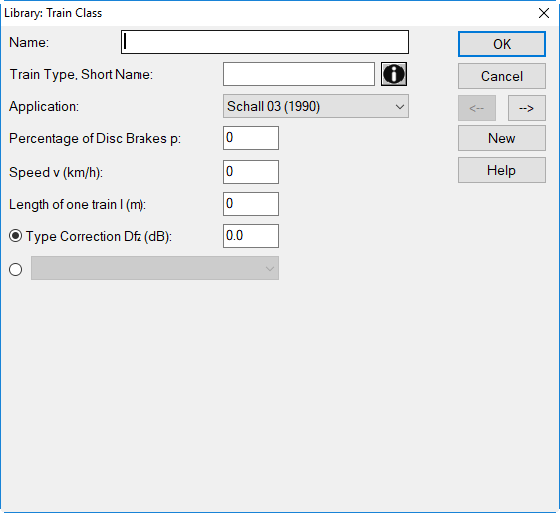
Dialog Library:Train Class: new train class for Schall 03 (1990)
Application Schall03 (2014)
The procedure Schall03 (2014) 16BImSchV-2014 makes use of relative spectra which are added to the specified A-weighted sum level. In case measured (absolute) spectra are to be used enter zero for the A-weighted sum level.
The following input data for a new train class are required:
- type of brake
- reference speed (in km/h), usually v0=100 km/h
- reference number of axles
For each relevant sub-source m (first column, see table 5, Schall03 (2014)) the relevant octave band level spectrum has to be entered. To this end, enter x for each relevant source height in column „valid“. This activates this sub-source. Enter a space to deactivate this sub-source.
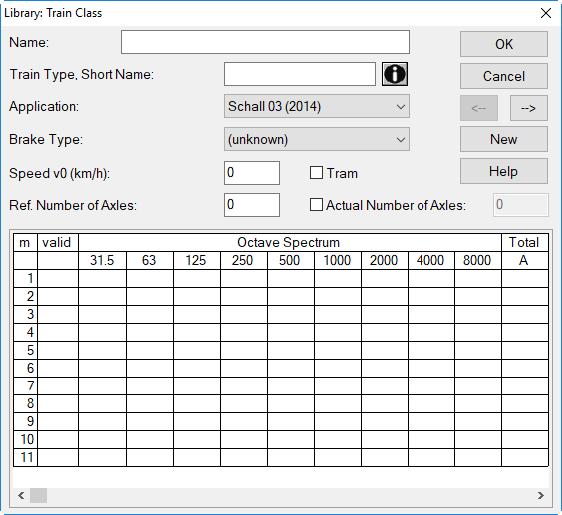
Dialog Library|Train Class: entering a new train class for Schall03-2014
Train compositions for Schall03 (2014)
In the local list „Number of Trains“ (on Railway dialog) the following train classes are listed:
- individual locomotives, cars, carriages, and all trains according to table 4, Schall03 (2014), and
- train compositions as defined in the global library of train classes, indicated by the prefix „ZZ_“.
Application Nordic Prediction Method
Nordic Prediction Method requires spectra of parameters a and b to define a new train class. The following input data is required to define a new train class:
- Name and Short Name
- Diesel engine yes/no
- octave band spectrum for parameters a and b
To enter the spectrum click into the respective cell of the table.
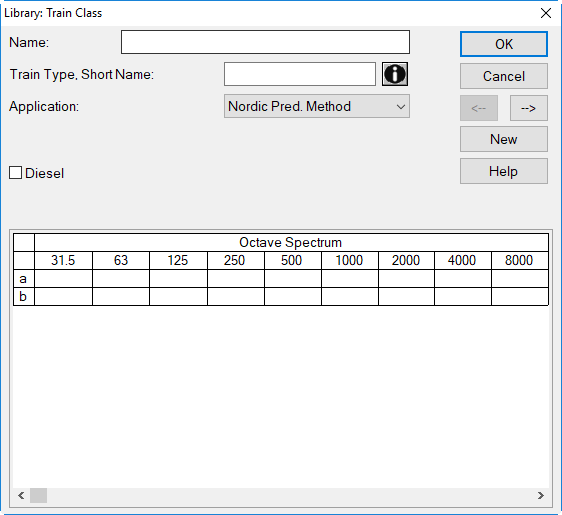
Dialog Library:Train Class: new train class for Nordic Prediction Method
Application NMPB-Fer 1996
NMPB-Fer 1996 requires an octave band emission spectrum to define a new train class. The following additional input data is required:
- Name and Train Type/Short Name
- Variation of v: equation describing the variation of emission vs. speed (e.g. 30 * log10 (v/vref))
- Reference Speed vref (km/h)
- number of bogies: applies to loco and cars (also several cars)
- options „Tram“ or „Pneu“ on/off
Note
In case both options „Tram“ or „Pneu“ are activated the source will radiate omni-directional, compared to non-pneu trams and other ordinary trains using a pre-defined directivity.
To enter the spectrum click into the respective cell of the table
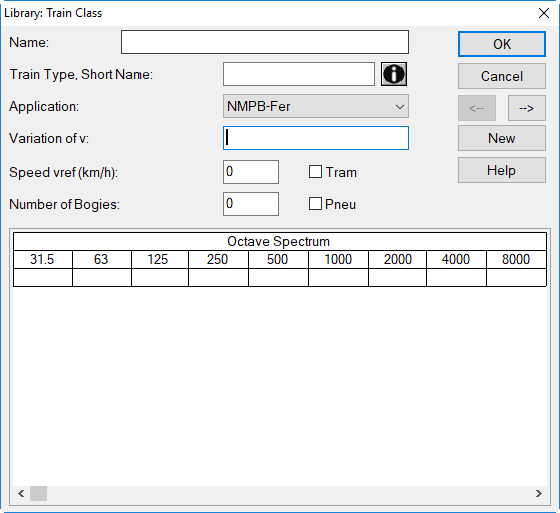
Dialog Library:Train Class: new train class for NMBP-Fer 1996
Application NMPB-Fer 2008
NMPB-Fer 2008 requires multiple third-octave band emission spectra at several heights (at 0.0, 0.5, and 4.0 m) to define a new train class. The following additional input data is required:
- Name and Train Type/Short Name
- option „Reflection Body/Screen“: When activated, body-screen interactions are included as defined in the configuration (see NMPB-Fer 2008).
- maximum speed vmax (km/h)
Sub-Source Table
NMPB-Fer 2008 requires to define sub-sources for a new train class at a single or several heights. In this case, in column „valid“ a letter x is entered to activate that respective row. Type space to deactivate a row.
- vref (km/h): reference speed
- Slope: variation of emission vs. speed (e.g. „30“ for 30*log10(v/vref))
- Num: number of bogies, applies to loco and cars (also several cars)
- third-octave band emission spectrum per sub-source
To enter the data click into the respective cell of the table.
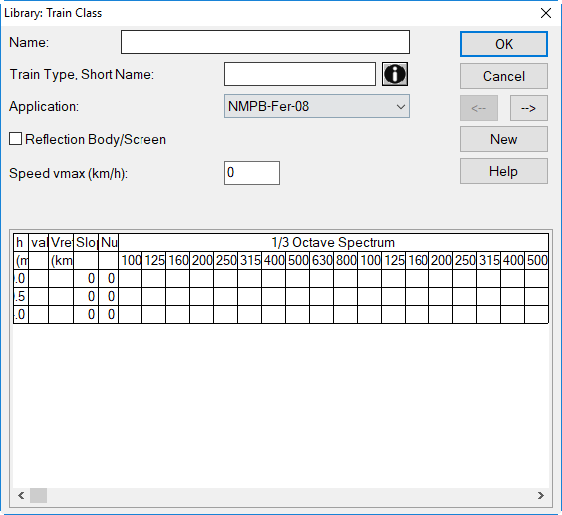
Dialog Library:Train Class: new train class for NMBP-Fer 2008
Application FTA/FRA
FTA/FRA requires to define sub-sources for a new train class at a single or several heights. In this case, in column „valid“ a letter x is entered to activate that respective row. Type space to deactivate a row.

Dialog Library:Train Class: new train class for FTA/FRA
Emission Model
Besides the sound exposure level SEL the FRA/FTA-emission model considers:
- default length (m), used for length correction
- reference length len_ref (m), used for emission correction
- reference speed S_ref (km/h) and speed factor K
- Fadjtrack: track correction for „rail vehicles“ and „streetcars“, see FTA-2018
- sub-source type (see below)
Source Heights
The FRA-source heights for all types of sub-sources result from tables 5-2 and E-1 in the FRA-report. As the source heights specified for horns from either tables differ (12 vs. 13 ft), just the height of 12 ft has been considered in the emission table.
As far as source height with FTA-source heights are concerned, CadnaA applies a height of 12 ft for horns, of 8 ft for diesel-electric-locos and 2 ft for all other types of sources (see table 6-5 in the FTA-report). The horns as point sources do not require a default length.
Default Source Lengths
The default source length for FRA-train classes is the physical length of each vehicle (loco, car/wagon), irrespective what reference length len_ref is used to specify the source emission (see FTA / FRA). As FTA-report evaluates the emission per car/loco this value is not relevant in this case.
Source Types
The following source types are used (see FRA-report, tables 5-2 and E-1, and FTA-report, table 6-4):
-
HSWH: High Speed Source - Wheel-Rail Interaction
-
HSPR: High Speed Source - Propulsion
-
HSAE: High Speed Source - Aerodynamic (with different heights)
-
LOCO: locomotive source
-
CAR: all other types of vehicles (cars, coaches)
-
HORN: warning horns
Option „Length“
With FTA/FRA train compositions ensure that the option "Length" in each train class is deactivated. This will cause the total length being the sum of all locos and cars. Entering a length for train compositions is neither required nor recommended.
Application CNOSSOS-EU
In conjunction with the European calculation method and most of the country specific implementations of CNOSSOS-EU, train classes are not defined within the official documentation. If this is the case, train classes need to be created beforehand and added to the local or global library. Subsequently, these will be selectable in the local train list (see CNOSSOS-EU (Railway)) or in the table Number of Trains (see Common Input Data, Number of Trains).
Train compositions make use of previously defined train classes, e.g. a freight train could be defined based on a train class for a single electric loco and a number of freight cars, thus making up an entire train.
With the application of CNOSSOS-EU the following input data is required to define a new train class (see also dialog):
- Name and Train Type, Short Name
- Maximum Speed vmax (km/h)
- Reference Number of Axles
- Vehicle Type
- Brake Type
- Contact Filter a3
- Vehicle Transfer Lh,veh
- Wheel Measure
- Aerodynamic Noise
- Non-Standard Squeal Penalty Ccu (dB): After activating this option, a train class-specific correction for squeal noise at the curve radii R<300 m and 300 m<=R<500 m can be entered. This train class specific value is assigned instead of the correction assigned based on the selected radius of curvature on the Railway dialog (see CNOSSOS-EU (Railway)).
Note
The preceding abbreviation (e.g. „EU“ or „DE“) refers either to the European calculation method (EU-2015, EU-2021) or to a country-specific implementation.
Application for further guidelines
The editing of new train classes for the following guidelines is described just in the German version of the CadnaA reference manual:
- ONR 305011
Entries in the default library
The default library contains for example the following datasets to be used with CNOSSOS-EU:
- DE_* from UBA-19
- DE21_* from UBA-22
- AT_* from RVE-2019
- AT21_* from RVE-2022
- FR_* from SNCF-2021
- FR21* from SNCF-2022
- BE_* from INFRA-2022
- ES_* from CNS-ES-22
- HU_* from CNS-HU-2025
Application HJ 2.4 (2021)
For the application of HJ 2.4 (2021) it is necessary to define train classes. Emission data is not provided by the standard and has to be entered either as measurement or as direct input of sound power level. Latter is only available for railway with speeds of between 200 km/h and 350 km/h.
Input parameters for Railway (Below 200 km/h) and Urban Rail Transit
This section refers to the procedure according to Annex B3.1 of HJ24-2021. The method is based on a measurement of the train in variable distance. In CadnaA this applies to the following train types:
- General speed railway
- High speed railway (speed of below 200 km/h)
- Metro, light rail (rotary motor)
- Metro, light rail (linear motor)
- Straddle-type monorail
- Tramcar
- Medium and low speed maglev train
The required input parameters are
- Speed v0 (km/h): Speed of the train at the measurement. For further information, see table B.3 of HJ24-2021.
- Distance of Measurement d0 (m): Orthogonal distance from railway track in 0.5 m height to the position of the measurement (3D distance). For further information, see table B.5 of HJ24-2021.
- Spectrum for Lp: Spectral sound pressure level of the measurement. In CadnaA. The levels must be entered without weighting (linear spectrum). Note: The input of spectra Lw1...3 is not relevant in this case.
Input parameters for Railway (speeds of between 200 km/h and 350 km/h)
This section refers to the procedure according to Annex B3.2 of HJ24-2021. In CadnaA this applies to the train type „High speed railway (speed above 200 km/h)“ only. The method is based on either (1) a measurement in fixed distance or (2) the direct input of sound power level for 3 heights:
- For the definition as measurement in fixed distance (d = 25 m, h = 3.5 m), the required input parameters are:
- Speed v0 (km/h): Speed of the train at the measurement.
- Distance Trainhead to Collector (m): Horizontal distance from the trainhead to the collector / pantograph.
- Definition of the track situation during the measurement: „Lp: Ballastless track - bridge beam“, „Lp: Ballastless track - roadbed“ or „Lp: Ballasted track“
- Spectrum for Lp: Spectral sound pressure level of the measurement. In CadnaA. The levels must be entered without weighting (linear spectrum).Note: The input of spectra Lw1...3 is not relevant in this case.
- For the definition as direct input of sound power levels for 3 heights, the required input parameters are:
- Selection of „Lw: Direct Input“
- Distance Trainhead to Collector (m): Horizontal distance from the trainhead to the collector / pantograph.
- Spectra for Lw1/2/3: Spectral sound power level for the 3 heights 0,5 m (Lw1), 2,5 m (Lw2) and 5,3 m (Lw3). Note: The input of a spectrum at Lp as well as the Speed v0 are not relevant in this case.