Automatic adjustment of IDs
Warning
This help page is displayed automatically when opening or importing a file if the IDs of objects or library entries do not comply with the defined rules. The IDs and any corresponding references have been automatically adjusted, and invalid characters have been converted. To improve traceability, the original ID (before conversion) has been stored in the memo field as the variable OLD_ID. For more information, see below.
Rules for IDs
An ID may contain only letters (A–Z, a–z), digits (0–9), or the underscore character (_). All other characters are not allowed. The first character must be a letter. These rules apply to the IDs of both objects and library entries (exception: the ID of aircraft groups).
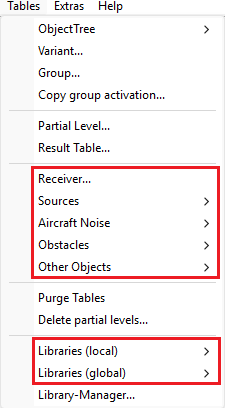
ID rules apply to all objects and library entries
Changes with CadnaA 2026
The rules listed above have existed in all previous versions of CadnaA, but the software did not enforce them. As a result, IDs such as ID.1 or ID-1 were possible. Depending on the object type and context, this either worked without issue or led to invalid references. Starting with CadnaA version 2026, these rules are now enforced by the software.
The reason for this change is the transition of CadnaA to UTF-8, which provides a much larger character set. While ANSI supports only a limited range of characters, UTF-8 can represent all characters and symbols used worldwide. However, some characters may look identical or very similar but are technically different. For example, the letter “K” can appear as:
| U+004B – The standard Latin “K” | U+212A – The Kelvin symbol |
 or K or K |
 or K or K |
Different “K” characters in Sans Serif font
These differences are visually imperceptible but technically distinct, which can lead to incorrect object referencing by ID. Enforcing the ID rules ensures consistent and correct functionality of the software.
Creating new objects
When creating objects or entering an ID, the ID enforcement works as follows:
- If a disallowed character is entered manually in the ID field of an object dialog, the input is rejected and a message appears:
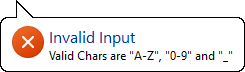
- If a text containing invalid characters is pasted (Ctrl+V) into the ID field, those characters are immediately converted, and the same message is displayed.
- If invalid characters are entered in the ID column of the object table, they are converted when confirming or closing the table.
- Every write operation performs an ID validation and adjusts it if necessary — this includes operations like “Modify Attributes” or writing via Lua.
- When creating PCSP tiles, the format has been changed from
PART:xxxtoPART_xxx.
Character Conversion
If possible, invalid characters in IDs are replaced with similar, allowed characters — for example, Ä becomes A. To preserve ID length, letters such as ß or ö are converted to s or o (not ss or oe). If no similar character exists, the character is replaced by an underscore (), for example % is replaced with .
Opening files
When opening files, all IDs of objects and library entries are checked against the rules. If invalid characters are found, they are converted. Any references to these IDs are also updated accordingly, for example:
- Industrial sources: sound power / sound pressure level input (attribute
LW_LI) - Railways: reference to a library entry of type “Train Numbers” (
LIBZZ) - Barriers / Buildings: reference to absorption spectra (
ALFAL/ALFAR) - Groups: activation/deactivation patterns
Arithmetic expressions are also supported. For instance, a previous expression ID.1+10*log10(3) referring to the spectrum ID.1 becomes ID_1+10*log10(3) referring to the spectrum ID_1.
Warning
Automatic adjustment may cause previously distinct IDs to become identical — for example, ID.1 and ID-1 both become ID_1. Any reference to ID_1 will then point to the first corresponding object in the table. This situation is visible to the user, as the consistency check will show a warning before calculation.
For traceability, when IDs are automatically adjusted, the original invalid ID is stored as a memo variable OLD_ID:
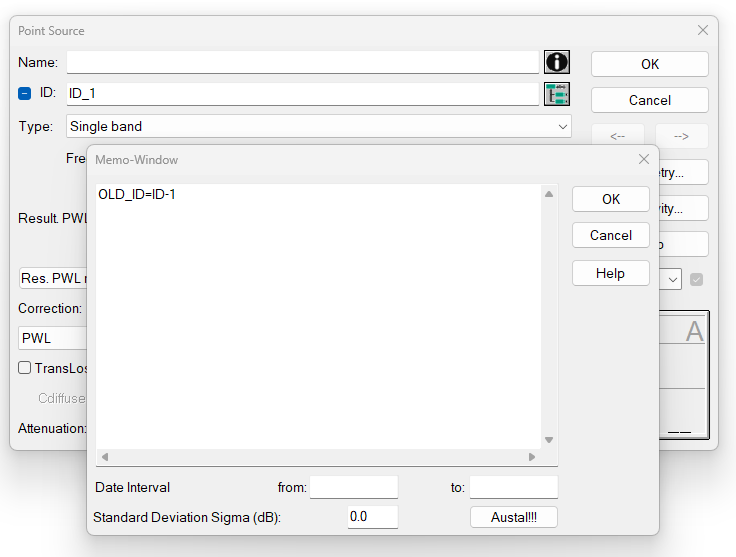
Automatic adjustment of ID-1 to ID_1 with the original ID stored as a memo variable
If references are also adjusted (e.g., LW_LI, LIBZZ, ALFAL/R), the previous expression is stored as a memo variable as well. The variable name is composed of the prefix OLD_ plus the attribute name, for example: OLD_LW_LI=ID.1+10*log10(3). When object attributes per variant are used, this applies only to the “master” not to individual variants.
Possible OLD_ memo variables per object type
- Point, line, and (vertical) area source: OLD_LW_LI, OLD_RW, OLD_DMP, OLD_SET_ID, OLD_TEINW_GANG
- Road: OLD_STRO_ID, OLD_STRGANG
- Parking lot, CadnaB building: OLD_TEINW_GANG
- Tennis: OLD_GANG
- Building, barrier, 3D reflector, CadnaB building: OLD_ALFAL, OLD_ALFAR
Note
In previous CadnaA versions, some automatically generated objects (e.g., camera presets in 3D view or PCSP tiles) did not comply with the ID rules. These are now automatically converted and may trigger a warning (displaying this help page).
Data import
All data imports also validate and, if necessary, convert invalid IDs, for example:
- Importing a CadnaA file
- Importing from Excel and mapping a table column to the ID attribute
- Importing library entries via the Library Manager
Finding objects with OLD_ memo variables
Depending on the use case, there are several ways to find objects with adjusted IDs:
- Open the object table for a specific object type and add the column MEMO_OLD_ID.
-
Use Modify Objects:
- Select an action and one/all object types, then use the condition
match(MEMO_OLD_ID$, "?*")to filter objects with theOLD_IDmemo variable. - Select an action and one/all object types, then use the condition
match(MEMO$, "*OLD_*)"to filter all objects containingOLD_in their memo field.
Possible actions include “Multiselect” (to highlight the objects in the 2D view) or “Change ObjectTree Assignment” (to add them to a group). Afterwards, the objects can be manually reviewed.
- Select an action and one/all object types, then use the condition
Global library on a server
When CadnaA 2026 is started for the first time, the global library is...
- checked against the rules for IDs and adjusted if necessary, and
- converted to UTF-8.
These changes are saved immediately.
Warning
If the global library is stored on a server and shared by multiple users, this automatic conversion and saving will make the database incompatible with installations that still use an older CadnaA version. Therefore, we strongly recommend updating all machines to CadnaA 2026 simultaneously.