"Calculation" tab
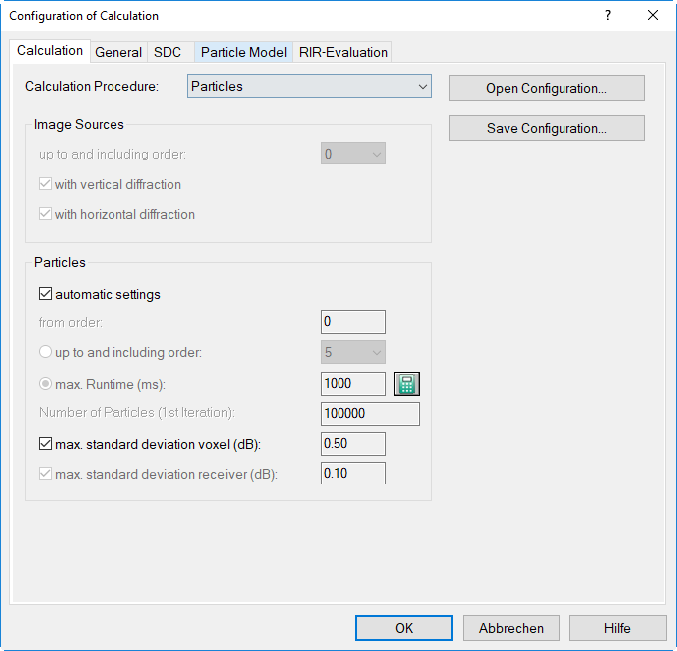
Dialog Configuration of Calculation, „Calculation“ tab
Calculation Procedure
Particles
With the particle model, a large number of "particles" are emitted randomly from each source location into all room directions. This method considers the reflective properties of the obstacles and the room surfaces up to the specified order of reflection. This method is applicable to any room shape. Using the particle model, reflections up to the 500th order can be considered.
For further details regarding this calculation method see Particle Model.
Image Sources --> Particles
When selecting the combined calculation procedure, the image source method will be used up to a specifiable upper order, and above of this order the particle model will be used, again up to a specifiable upper order.
For details on this combined procedure see Particle Model, Combined Procedure „Image Sources --> Particles“.
Image Sources
With the image source method, reflections occurring at the room surfaces and at obstacles (also at reflecting sources) are modeled by rays. Each ray path is tracked individually considering reflections from any kind of obstacles (and the room surfaces) up to the specified order of reflection accounting for their respective reflective properties. This method is applicable to any kind of room shape. Using the model of image sources, reflections up to the 20th order can be considered.
For further details regarding this calculation method see Image Source Model.
VDI 3760
The procedure as standardized in the guideline VDI 3760 is applied which is based on the image source method with diffraction and damping according to Kuttruff and Jovicic.
For further details regarding this calculation method see Calculation according to VDI 3760.
Diffuse Field (statistical)
This setting calculates the sound pressure level according to the statistical theory of the reverberation in rooms by Sabine. Applying this theory, results with sufficient precision are just obtained for a diffuse sound field in the room. If this does not apply the sound levels tend to overestimated.
For further details regarding this calculation method see Diffuse Field Model.
Open/Save Configuration
These buttons enable to save and reopen the configuration of calculation (file extension *.cniconf).
Options for Particle Model
These settings are relevant for the procedure "Particles“ (i.e. particle model) and for the combined procedure „Image Sources --> Particles“.
-
Option „automatic settings“ (default): When enabled, the following values are used:
- from order ... up to and including order: Starting from the direct sound (zero order) the particles are pursued as long as being specified by the maximum runtime, regardless of the required maximum order.
- maximum runtime (ms): In a pre-calculation based on the room and the object‘s properties the maximum runtime is estimated (by determining the mean free path and the mean absorption). This pre-calculation can also be triggered by clicking on the calculator symbol. The estimated maximum runtime is afterwards displayed in this box.The automatic runtime estimation is limited to a maximum of 10 s based on the mean free path (editable). The estimated values (mean free path MFW, average squared segment length MQFW and gamma squared) are written to local text blocks (see Text Blocks (local)).
- Number of Particles (1st iteration): By default, a particle number of 100,000 per iteration is used (see „max. standard deviation“).
- maximum standard deviation voxel (dB): By default, the standard deviation for voxel is deactivated when using the automatic settings. It may be activated with a then fixed value of 0.5 dB for the standard deviation of each voxel. This value then must be met by all voxels in calculation areas and outside of box-type objects. If not, a further iteration is executed.maximum standard deviation receiver (dB): By default, a standard deviation of 0.1 dB is used. This value must be met by all active receivers. If not, a further iteration is executed.
Note
From comparative calculations follows that the estimation of the maximum runtime represents in 95% of the situations a reasonable approximation for cubic rooms having an open plan (i.e. no complete blockage of sub-volumes in the room). This estimate is not suitable for maze-like room structures (e.g. rooms in a multi-storey building with a common staircase).
With the option „automatic settings“ inactive the following options can be specified individually:
- from order: Here, the order (n+1) is shown from which the particle model is starting when the combined procedure is selected. With the particle model solely selected, the initial order is 0 (zero).
-
up to and including order: Specify the order up to which the calculation using the particle model shall be performed. Up to the 500th order of reflection can be considered.
-
maximum Runtime (ms): Up to this time the particles - regardless of their order of reflection - are tracked and included in the calculation. Specifying the maximum runtime has the advantage that all particles up to this limit are included in the echogram which would not be the case when specifying the maximum order, as particles subjected to numerous early reflections would not contribute to the later parts of the echogram (default value: 1000 ms = 1 s).
-
Calculator Symbol
 : When clicking this symbol the maximum runtime is estimated in a pre-calculation using the room‘s and object‘s properties (by determining the mean free path and the mean absorption). The estimated maximum runtime is shown in this box afterwards.
 -
Number of Particles (1st iteration): This is the absolute number of particles used in the calculation for each iteration, distributed among all active sources of the project (default: 100,000 particles). The statistical accuracy of the levels calculated using the particle model (and the decay curves) depends on the number of particles entering the counting volume elements (voxel).
-
maximum standard deviation voxel (dB): During iteration this standard deviation is used as a break condition for the level calculation on the grid and the voxel gird. By default, a standard deviation of 0.5 dB is used. This must be met by all voxels in calculation areas and outside of box-type objects. If not, a further iteration is executed.
- maximum standard deviation receiver (dB): In the course of the iteration this standard deviation is used as a break condition for the level calculation at receivers. By default, a standard deviation of 0.1 dB is used. This value must be met by all active receivers. If not, a further iteration is executed. For indivual receivers, an indivual standard deviation may be set, see Individual standard deviation (particle model).
Note
In the calculation, the criterion "max. standard deviation voxel" is just used for so-called „useful“ voxels. This means that the criterion is not applied to voxels intersected by the room, by objects or calculation areas.
Note
For both standard deviations it holds: The smaller the respective value, the more iterations are required, prolonging the calculation time.
Options for Image Sources Model
These settings are relevant for the calculation procedure „Image Sources“ and for the combined procedure „Image Sources --> Particles“:
- up to and including order: Here, the maximum order n is selected or entered up to which the reflection and screening calculation occurs with method "Recursive Reflection". Up to the 20th reflection order can be considered.
- option "with vertical diffraction": With this option active, the shortest path length difference for diffraction around vertical edges of obstacles is determined (diffraction across the top and the bottom of the obstacle/s). In this case, also paths between obstacles in the vertical direction are taken into account.
- option "with horizontal diffraction": With this option active, the shortest path length difference for diffraction around horizontal edges of obstacles is determined (diffraction to the left & right around the obstacle/s). In this case, also paths between obstacles in the horizontal direction are taken into account.
If both options are activated (standard setting), both, the vertical and the horizontal plane are evaluated.