Show Bitmap
With this command on the Options menu or by clicking the respective symbol on the symbol bar, a dialog opens enabling to specify the bitonal scaling of Black&White bitmaps.
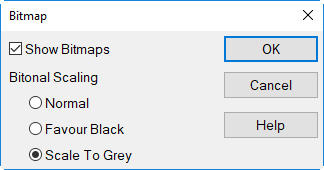
Option "Show Bitmaps"
This option enables to activate/deactivate globally the display of bitmaps. Identical with the Option „Show Object Type“ in the Apperarance menu (see Appearance). SHIFT+Click on the Bitmap icon in the toolbar directly toggles appearance of the display withoug opening the dialog.
Bitonal Scaling
Select here what kind of bitonal scaling shall be applied with Black&White bitmaps (having 1- bit color depth):
- Normal: The black level of the first pixel found is used.
- Favour Black: When a black pixel is found while zooming in, the color black is used.
- Scale To Grey: An average level of grey is used based on all percentages of grey.
The selected option governs the quality of bitmaps displayed on screen when zooming in and out (Zoom +, Zoom -). The option "Scale To Grey" requires a maximum of calculation time.
Note
The option "Bitonal Scaling" has no effect for colored bitmaps. Colored bitmaps can be displayed in grayscales by using the respective option in the Bitmap object dialog (see Appearance).