Box-Type Source
The box-type source in CadnaR is cuboid and covered with area sources on all sides. It is therefore particularly suitable for the modeling of machines which are equally source and obstacle.
Regarding the input options using the mouse see Inserting Objects.
The radiation from individual area sources can be suppressed. The surface of the box-type source may have sound absorbing, scattering and transmitting properties.
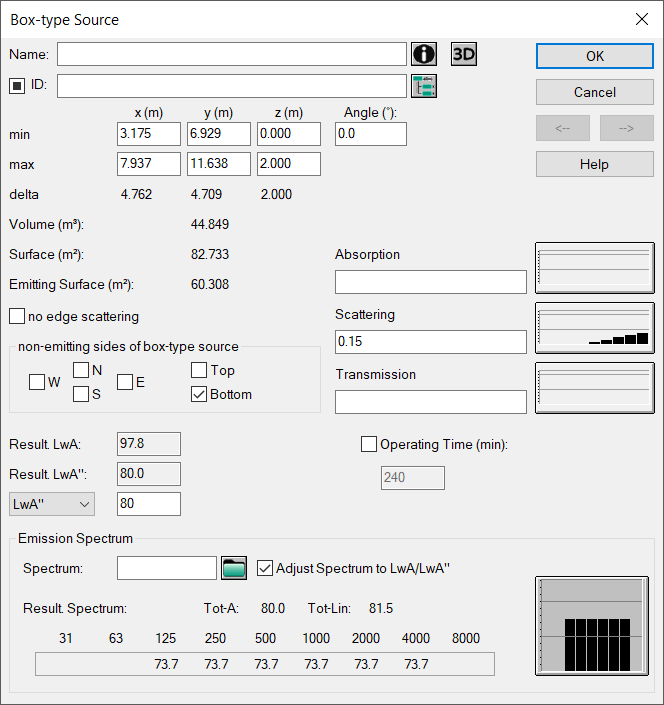
Dialog Box-Type Source
Dialog options
-
Name, Memo-Window and ID see Common Input Data
-
not emitting sides of box-type source: Provided the source has finite dimensions (e.g. height <>0) this option enables to control the radiation for up to six surfaces of the box-type source.
- N-S-E-W: The direction refers to a non-rotated source with the North direction pointing upwards on the screen.
- Top/Bottom: upper and lower surface of the source
-
Result. LwA / Result. LwA" (dB): shows the resulting A-weighted sound pressure level and the A-weighted sound pressure level per unit area
- Sound Power Level LwA / LwA" (dB), operating time and dialog range „Emission Spectrum“: see Common Input Data - Sources
- Buttons „Absorption/Scattering/Transmission“: see Common Input Data - Obstacles
- Option „no edge scattering“ and button „3D“: see Common Input Data - Obstacles
- Geometry Data
- min (x,y,z): coordinates of the lower left corner of the box-type source
- max (x,y,z): coordinates of the upper right corner of the box-type source
- Angle: angle between the first polygon section and the +x axis (0°)
- delta: difference max (x,y,z) - min (x,y,z)
- Surface in m²/Volume in m³
- Emitting Surface (m²): considers non-emitting sides (see below)