Rich Text Format (.rtf) & Text Files (.txt)
These export formats offer to export the calculation results or object tables can be exported, either as unformatted data (text file TXT) or as formatted data (Rich Text Format, RTF). To this end, select on the dialog Save as one of these file types.
„Options“ button
Via the „Options“ button a template file *.txt, *.rtf or *.docx can be selected or the selected template file edited.
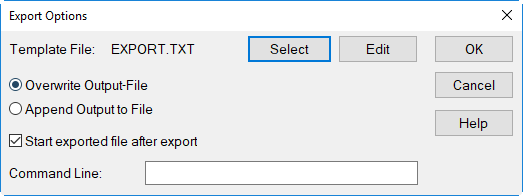
Dialog Options for Export (here for txt export)
- Template File: displays the filename of the currently selected template file for printing a report. The delivered template files (see below) can be modified using keywords (see Keywords) and saved with a new filename or created from scratch (see below). When reinstalling, the delivered template files which have been modified while their filename was kept are overwritten.
- button "Select": Use this button to select a template file for the printout. The export template file has the file extension TXT or RTF. With RTF-files diagrams and tables remain unchanged when exported. Since template files for printing (see Print Report) also use the file extension TXT, both should be kept separately from each other.
- button "Edit": After clicking this button the actual template file chosen can be edited and saved using a new name.
- Export Options:
- Overwrite Output-File: This option is always selected in case the option "Append Output-File" is not active.
- Append Output-File: This option only should be selected if the ASCII output file format is used. The exported data will be appended at the end of an existing file.
- Start exported file after export: When this option is active, the application linked to the file type is started and displayed automatically after export of the data.
- Input Box "Command Line": In order to start an application different from the application linked to the file type use the command line.Example: excel %sMS-Excel is started to display the exported data (%s is the variable for the filename).
- Button OK: Clicking this button causes the data to be exported.
Template Files for TXT and RTF Formats
Template files contain commands that control the printing or the export of calculation results. Keywords (see Keywords) are essential for these commands. A text editor or a word processor is used to create a text file containing those commands and - if required - additional text. This file is saved in TXT (ASCII) or RTF (Rich Text Format) resp. and ready to be selected as a template file for output and export.
Structure
Keywords in template files must appear in parentheses, preceded by a hash symbol (#) before the leading parentheses. The parameters of a keyword follow the keyword itself, enclosed within the same parentheses, separated by commas from each other.
Example Command
Another example of a command printing the word „CadnaR“ using font Times Roman, size 14 pt and in bold is:
#(Font, Times Roman, 14, f)CadnaR
In case some parameters are missing, the default value is used. For instance, assuming that the font would not have been specified, so:
#(Font,,14,f)CadnaR
the (default) font Arial would have been used instead for printing the text.
As part of the template file, ordinary text an be entered not requiring a keyword. This enables to design reports or protocols containing the actual calculation results.
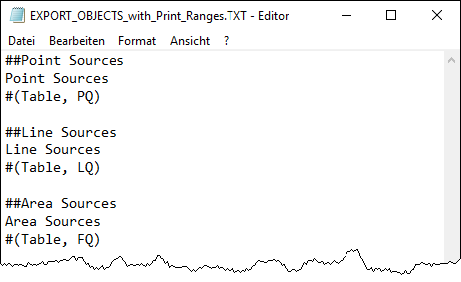
The following figure shows the first lines of the delivered template file PRINT_OBJECTS_with_Print_Ranges.TXT with a more complex structure.
Print Range
Template files can be structured by paragraphs using a double hatch (##). The paragraphs have to be defined within the template file at the beginning of each print section. The name of all paragraphs appear as „Print Range“ on the dialog Print Report.
For example the above template file uses a its top the follwoing print paragraphs:
##Point Sources
##Line Sources
The print paragraphs themselves will not be printed.
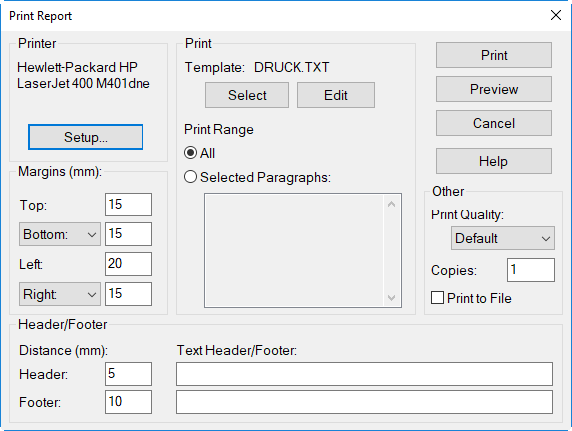
The defined print paragraphs in a template file appear in the „Print Range“ on the Print Report dialog.
Supplied Template Files TXT/RTF
The following template files are supplied:
| PRINT_OBJECTS.TXT or EXPORT_OBJECTS.TXT | template files to print or export object tables (exported file in TXT format) |
| PRINT_OBJECTS_with_ Print_Ranges.TXT | template file to print or export object tables using print ranges (exported file in TXT format) |
| PRINT_SDC_T_DATA. TXT or EXPORT_SDC_T_DATA.TXT | template files to print or export the graphics/data of the SDC-curve and the reverberation diagram (accord. to VDI 3860), exported file in TXT format |
| EXPORT_OBJECTS.RTF | template file to export of object tables (exported file in RTF format) |
| EXPORT_SDC_T_DATA.RTF | template file to export the graphics/data of the SDC-curve and the reverberation diagram (accord. to VDI 3860), exported file in RTF format |
In opposite to the TXT export, using the RTF export format retains the frames in tables.