Groups
The grouping concept of CadnaR is a versatile and powerful tool for the management of project data. By using the ID, which is available for all types of objects (see Common Input Data), groups of objects can be defined based on a common part of the ID for all objects in a group.
Provided distinct rules are respected when defining the ID, a project and the comprising set of data can be extended at any time by entering further objects, not causing any problems as the individual sources or the groups are clearly established.
Table Groups
Open the list of groups from the menu Tables|Group. By default, this list is empty as no groups have been defined. Groups can be created, edited, and deleted manually via the table’s context menu, but it is recommended to use the ObjectTree (see ObjectTree) to define groups. Groups of the ObjectTree get indented by their designation according to the hierarchy level.
Note
The groups are structured hierarchically. The order of the groups in the group list is decisive. This list is run through from top to bottom when checking the activation state of an object. The first entry (i.e. the first non-empty field) is decisive for the activation state of the object. Even if the object is activated or deactivated in an subsequent object group further down the list, this will not affect its activation state.
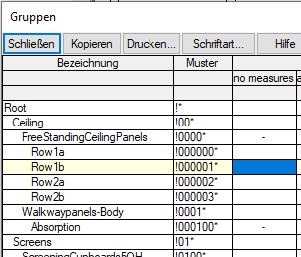
An object of group „Row1b“ is deactivated because of the entry for the parent group.