Library-Manager
By the library-manager on menu Tables spectra and other kinds of libraries be copied or deleted from CadnaR files (file extension *.cni) or from library files (file extension *.dat).
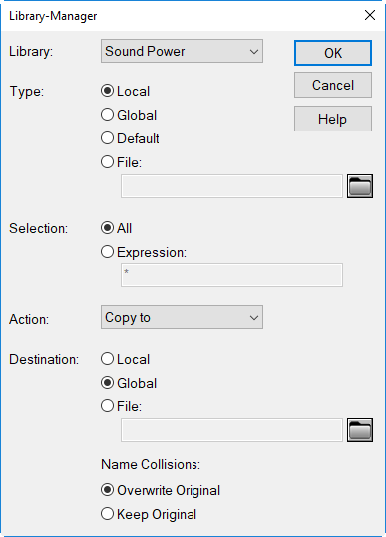
Dialog options
- Library: Select from the list box of available libraries:
- Sound Power
- Sound Transmission
- Absorption Coefficient
- Scattering Coefficient
- SET-S
- Color Palette
- Product Library
- SymLib (symbol library)
- Sym3DLib (3D symbol library)
- Type: Select the type of library:
- Local
- Global
- Default: spectra delivered with CadnaR
- File: select a file via the file selector symbol (file types *.cna, *.dat).
- Selection: By this option either "All" spectra of the corresponding library are selected or just those spectra the ID of which corresponds to the expression entered.
- Action: The selected spectra or objects can either be copied or deleted. With option "copy to" selected specify the "destination".
- Destination
- Local
- Global
- File: Select a file via the file selector symbol (file types *.cni, *.dat).
- Name Collisions: By these options it is determined how to proceed in case of name collisions.