Voxel Grid menu
Specification
The voxel grid is a volumetric grid enabling to calculate the sound pressure level in all three dimensions simultaneously. The word voxel (i.e. volumetric element) is a combination of the words volumetric and pixel.
By default, just equidistant voxel grids or horizontal grids (see Specification) can be specified. In order to use non-equidistant voxel grids see Miscellaneous.
Enter the spacing dx between the individual voxels in x direction of the voxel grid. Upon calculation of the voxel grid the entire room volume is covered with voxels and calculated (default voxel spacing dx=dy=dz=0.5 m). When changing the grid spacing it will be asked whether the respective other grid shall be adapted to the same spacing.
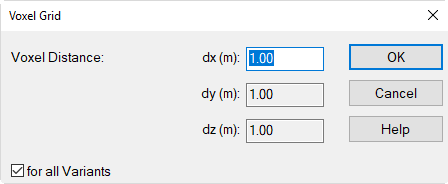
Dialog VoxelGrid|Specification
Smaller voxel distances lead to a higher density of matrix points and, consequently, to stricter contours in the graphic representation of the lines or areas of equal sound level. On the other hand, however, the denser the matrix points the more computing time is required.
Option „for all Variants“
With more than a single variant active (see Variants), this option is active by default. In this case, a common voxel distance is used for all active variants.
Calc Voxel Grid
Selecting this command from the VoxelGrid menu will cause to generate volumetric matrix points across the entire room volume (using the defined properties of the voxel grid) and to calculate the sound pressure level at those points - and, if any, the echograms and the room acoustical parameters. Furthermore, the echograms and the room acoustical parameters are recalculated at all active receivers for reasons of data consistency.
The values of the horizontal grid (2D-grid) are interpolated at the defined grid receiver distances and height using the voxel grid data by a tri-linear interpolation in case the 2D-grid height does not corresponds with a multiple of the voxel distance dz. Prior to the calculation, the object data are subjected to a consistency check (see Consistency Check).
Calculation Progress
The progress of calculation is indicated on a separate dialog, also enabling to cancel the calculation of the voxel grid. After calculation an additional list box is displayed on the symbol bar of the CadnaR main window enabling to select a different grid height.
Interpolate Grid Values from Voxel Grid
When selecting this command the levels on the 2D grid will be interpolated at the defined grid receiver distances and height using the voxel grid data by a tri-linear interpolation.
This interpolation is carried out, too, when the 2D grid receiver height corresponds to a multiple of the distance dz of the voxel grid.
Note
For reasons of the calculation time required, the voxel grid has, in general, equal or larger distances dx, dy and dz than the grid width of the 2D grid. This feature enables to adapt the results of the voxel grid to the representation of the 2D grid.
Interpolate Receivers from Voxel Grid
When selecting this command the levels at receiver points will be interpolated using the voxel grid data by a tri-linear interpolation.
This interpolation is carried out, too, when the 2D grid receiver height corresponds to a multiple of the distance dz of the voxel grid.
Note
This feature enables to calculate the levels at receivers being inserted after the voxel grid has been calculated.
Delete
This command deletes the present voxel grid without a confirmation prompt, provided just a single variant exists. Otherwise, the dialog Delete VoxelGrid is displayed.
With the SHIFT key pressed, just the voxel grid of the current variant is deleted. With the CTRL key pressed, again, only the voxel grid of the current variant is deleted, but the voxel distance is reset to the default distance.
Export
This command enables to export the voxel grid to a proprietary binary format for import into the software „pCon.planner“ developed by EasternGraphics GmbH, Germany.