Moving Objects
Move objects using the mouse
In order to move an object in the graphics, activate it by a click onto its border with the left mouse button. Click again on the highlighted object and drag it while holding the left mouse button pressed. The dragging mode is displayed in the graphic by two crossed double-headed arrows:
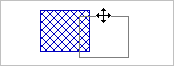
Move the object to the new location and release the mouse button.
Move into x or y direction only
Holding the SHIFT key pressed at the same time, causes the object to be movable just in x or in y direction, however not in both directions at the same time.
Moving objects using the keyboard
Selected objects can be moved by holding the CTRL key and pressing the arrow keys in the x (← →), y (↑ ↓) or z direction (page up, page down). The following steps are available:
- CTRL + Arrow/Page Up/Down: shift by 1 cm
- CTRL + SHIFT + Arrow/Page Up/Down: shift by 10 cm.