Rotating Objects
The following notes refer to the rotation of line-like objects only. Area-like objects cannot be rotated.
To rotate an object, first mark it by a click with the mouse. Then, click again while holding the ALT key pressed. A arrow-headed rotation circle appears to indicate that rotation mode is enabled (1).

(1)
Now, move the mouse with the mouse button pressed in a circle about the object. The object is rotated by an equivalent angle (2).
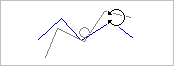
(2)
Rotating an object in steps
To rotate an object in steps of 90° hold the SHIFT key pressed at the same time.
Rotating and duplicating an object
To rotate and duplicate an object, hold the SHIFT and the CTRL key pressed at the same time.