Sound Transmission (local/global)
In this table spectra of the transmission factor or the sound reduction index (transmission loss) for obstacles can be entered and managed. New lines are generated using the context menu of the table. Double-clicking in a table row opens the dialog Sound Transmission.
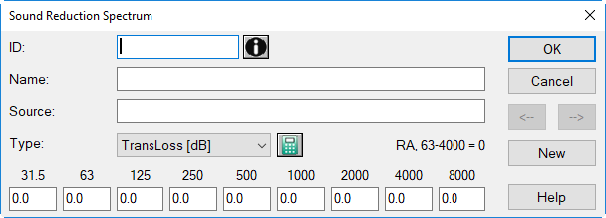
Dialog options
- ID, Memo-Window, Name: see Common Input Data
- Source: description of the data's origin
- Type: Select the type of input values (sound reduction index [dB] or transmission factor [%]).
Note
Internally just transmission factors are used, with a higher precision than displayed.
-
Pocket Calculator Symbol
 : Via this symbol the present spectrum can be modified (see Modify Spectrum).
 -
RA 63-4000: shows the A-weighted sound reduction index based on the input octave values from 63 to 4000 Hz (corresponds to the combined parameter Rw+C63-4000, refer to ISO 717-1).
Note
When using the A-weighted sound power level LwA (i.e. not a spectrum) as emission parameter the value of RA, 63-4000 is used in the calculation of the transmitted energy at obstacles. This value is - in contrast to the weighted sound reduction index Rw - energy equivalent.
- Octave Bands 31.5 to 8000 Hz: Enter the sound reduction index or transmission factor the each octave band here. Consider that a levels 0 dB does not mean "no input" in acoustics. Therefore, when having no data in an octave band available, enter a space or keep the input box empty. This will cause this band to be considered as not valid.
Note
When a value in an octave band of the selected frequency range is missing, a message is displayed indicating the missing data of a spectrum. By ignoring the message (button "Next"), a transmission factor of 0% is assumed for this frequency band.
- Arrow Buttons <-|->: to move to the next/previous dataset
- Button "New": generates a new table row below the row currently selected
Pasting spectra via the clipboard
Spectra values separated by tabulator marks can be pasted from the clipboard. Place the cursor into the box which is supposed to receive the first value and press CTRL+V or select the Paste command from the context menu.