Absorption Coefficient (local/global)
In this table spectra of the absorption coefficient can be entered and managed. New lines are generated using the context menu of the table. Double-clicking in a table row opens the dialog Absorption Spectrum.
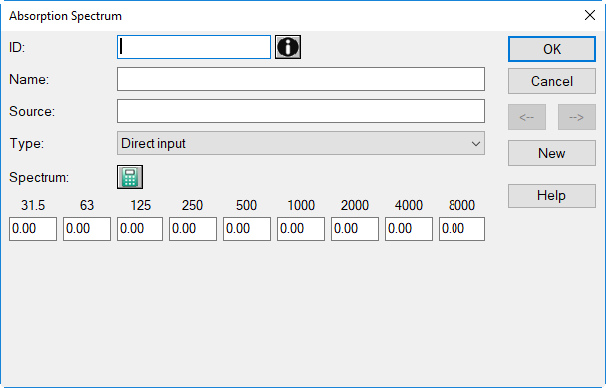
dialog Absorption Spectrum, type „Direct Input“
On this dialog, absorption spectra can be entered directly or generated after selecting a product from the product library (see Product Library (local/global)). The following spectrum types are available from the list box:
- Direct input: An absorption spectrum in octave bandwidth can be entered directly.
For all other types, the conversion into octaves - when referencing an input spectrum in third-octaves from the product library - calculates the octave values from the arithmetic mean of the third-octave values.
-
Absorption from product (Alpha_S): An absorption spectrum in third-octave bandwidth entered in the product library is converted into an octave spectrum by arithmetic averaging:For this type „Absorption from product“, in case the absorption coefficient in the octave band at 8000 Hz is missing, the value of the 4000 Hz octave band will be used instead (see the note in the Memo-Window of that absorption spectrum).
\(\alpha_{Okt}=\frac{1}{3}(\alpha_{3rd-oct\_1}+\alpha_{3rd-oct\_2}+\alpha_{3rd-oct\_3})\)
-
Single object from product (A_Obj): The equivalent absorption area of a single object from the product library is converted into an absorption spectrum by reference to the object‘s surface S_Obj (m²):In CadnaR, the object surface S_Obj corresponds to the surface of the modeling-dependent simplified geometry exposed to the sound field. In the simplest case, this is the surface of a CadnaR object. However, this is not necessarily the case with more complex objects (e.g., a chair with the object surface = sum (seat surface, back surface).
\(\alpha_{object}=\frac{A_{object}}{S_{object}}\)
-
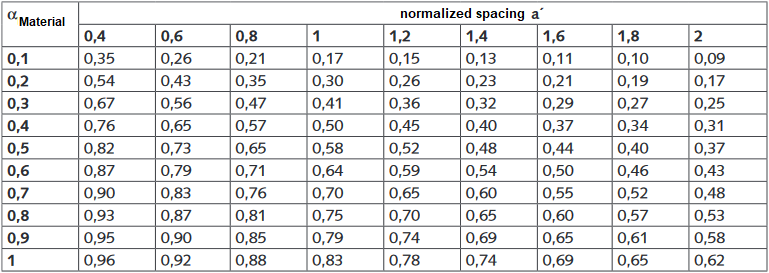
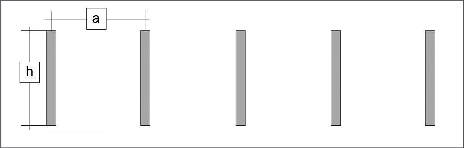
Baffle as single element (Alpha_S): This option refers to absorption spectra of baffles or other objects, mounted at a short distance to each other, in a given arrangement, and using a reflective frame according to ISO 354. In this case, there is no diffuse field between objects or between frame and object. For a diffuse field in the room, the absorption coefficient αMaterial of the baffle material is determined from a look-up table. The table contains the absorption coefficient measured according to ISO 354 for the normalized spacing a‘ (see Literature).The normalized spacing is given by: a' = a/h (baffle distance at centers/ baffle height), as shown in the figure below:This type of modeling as individual elements offers full flexibility with respect to individual baffle arrangements, with possibly different suspension heights or ceiling areas remaining uncovered from baffles (for example, due to high machinery or other equipment). A drawback results (compared with the type „Baffle as suspended plate“, see below) from the increased modeling effort since it requires an input element by element.
-
Baffle as suspended plate (Alpha_S): This option refers also to absorption spectra of baffles etc. measured using a reflective frame according to ISO 354. In the model, a suspended plate is used whose absorption is to be determined. This substitution approach is only applicable in situations where the baffles are installed across the entire surface and at a constant suspension height.The absorption coefficient of the suspended plate αplate located at the baffles lower edge results from the absorption spectrum αS,ISO from \(\alpha_{plate}=1-\sqrt{1-\alpha_{S,ISO}}\) and the transmission factor of the plate from \(\tau=1-\alpha_{plate}\). Besides the calculation of the plate‘s absorption spectrum, the transmission factor is also assigned automatically.
Dialog options
- ID, Memo-Window, Name: see Common Input Data
- Source: description of the data's origin
- Type: type of absorption spectrum (see above)
-
Pocket Calculator Symbol
 : Via this symbol the present spectrum can be modified (see Modify Spectrum).
 -
Tot-A/Tot-Lin: shows the A-weighted and the linear (unweighted) total levels of the spectrum.
- Octave Bands 31.5 to 8000 Hz: Enter the level in the each octave band here. Consider that a levels 0 dB does not mean "no input" in acoustics. Therefore, when having no data in an octave band available, enter a space or keep the input box empty. This will cause this band to be considered as not valid.
Note
When a value in an octave band of the selected frequency range is missing, a message is displayed indicating the missing data of a spectrum. If the message is ignored ("Next"), then the resulting level for this frequency band in the dialog Receiver is set to invalid ("-99 dB").
- S_Obj (m²) - with type „Single object from product (A_Obj)“ only: area of the object
-
Select Product
 : Click on the file selector symbol to select a product from the local or global Product Library. After selection the product‘s ID gets copied to that box.
- selection from the local library: by clicking the file selector symbol
- selection from the Global Library: by clicking the file selector symbol while holding down the SHIFT key
- Arrow Buttons <-|->: to move to the next/previous dataset
- Button "New": generates a new table row below the row currently selected
Pasting spectra via the clipboard
Spectra values separated by tabulator marks can be pasted from the clipboard. Place the cursor into the box which is supposed to receive the first value and press CTRL+V or select the Paste command from the context menu.
Specifying a user-defined air absorption
A user-defined air absorption can be specified. To this end, create a new spectrum in the local absorption library having the ID "SYS_ATM_ABSORB" and values entered in dB/km. These values will be used until this spectrum is deleted or its ID changed.
Literature
- Probst. W.: Sound Absorption of Baffle Systems,