Calibrate Spectra
This feature allows to calibrate, absorption and scattering coefficients to a user-defined target reverberation time.
If the acoustic material properties to be used for a CadnaR calculation are subject to a certain uncertainty, they can be adjusted automatically with the help of this function. For this purpose, several calculations of the reverberation time are preformed with a slight variation of each material property within a predefinable interval. In an iterative process, the material parameters are adjusted until the best possible match with the specified target reverberation time is achieved.
This function can be applied if e.g. reliable measurement data for the reverberation time is available while there are small remaining uncertainties regarding the absorption and scattering coefficients used in the CadnaR model - be it because the material is not exactly known or identifiable (e.g. acoustic perforated ceiling with unknown material layer), or because the simplified 3D modeling tends to omit absorption-increasing objects, or if it is unclear which scattering coefficient should be applied to the room boundary surfaces which have been modeled as smooth surfaces but in reality have a certain structure.
It is therefore important to specify the material values as accurately as possible before using this function, to allow a very limited number of materials (rather 2 than 25) with a calibration interval that is not too big, and to always question the results after a calibration has been performed and, if necessary, to re-execute the function with adjusted initial values (e.g. if, in an extreme case, a textured acoustic ceiling has become a smooth concrete wall after calibration).
The calibration always affects the material properties, i.e. the spectral absorption and scattering coefficients. In very simplified terms, the greater the sum of the object surfaces to which the respective material property is assigned, the greater the influence of the material on the reverberation time. It is much faster to calibrate a few materials with a large influence on the reverberation time instead of also taking into account many materials with a small influence.
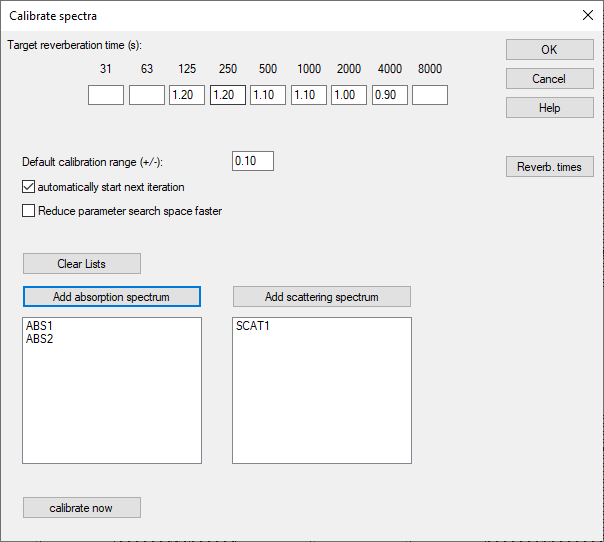
Dialog „Calibrate Spectra“
Dialog options
Target reverberation time
User-defined target reverberation time serves as a reference for the calibration result for the spatially averaged reverberation time (of all active receivers of the current variant). No entry for an octave value means that this octave is excluded from the calibration.
Default calibration range
Default value for maximum deviation of the final result after calibration from the start value before calibration per material per octave. Default: 0.1. The exact interval per material and octave can be defined differently from the standard specification as described below.
automatically start next iteration
If this option is deactivated, the calibration process stops after each iteration and allows the user to decide whether the result achieved so far is sufficient and the material adjustments already made should be adopted. If this option is enabled, the calculation continues until the best possible calibration result has been achieved (enabled by default).
Reduce parameter search space faster
May lead to a shortening of the calibration process by skipping the calculation of some parameter combinations. However, a better match with the target reverberation time may be achieved without using this option (disabled by default).
Lists containing absorption and scattering spectra to be calibrated
The lists show which absorption spectra and scattering spectra are to be calibrated.
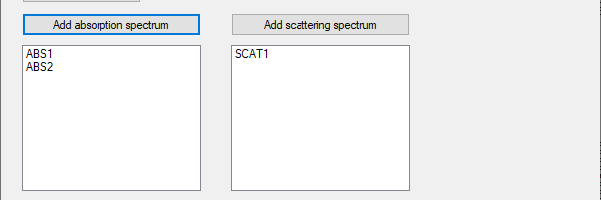
Dialog Calibratable Spectrum
By double-clicking on one of the list entries, the dialog "Calibratable spectrum" is opened, which allows an exact definition of the interval limits for the calibration of the material:
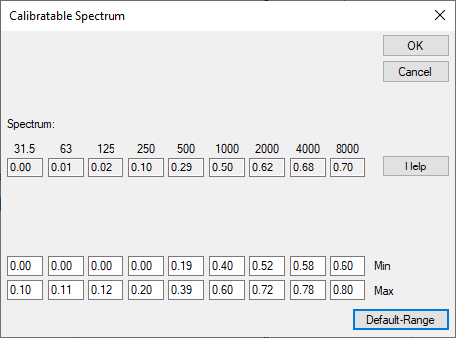
The "Default Range" button can be used to automatically adjust the upper and lower calibration interval limits (Min, Max) based on the value specified for "Default calibration range".
Clear Lists(Button)
Clears the entries in the lists of spectra to be calibrated.
Add absorption spectrum and add scattering spectrum(Buttons)
Opens the local library to select a material. Only spectra can be calibrated. Nevertheless it is conveniently possible to create a scattering spectra for a given roughness value (see „Create scattering spectrum from roughness K“ in chapter Scattering Coefficient (local/global) ).
Note
the calibration changes the existing spectrum. If the initial spectrum, i.e. the start value of the calibration should be available later it is recommended to create a copy (altering the initial ID) of this spectrum.
Reverberation time(Button)
Opens the dialog „Spatially averaged reverberation times“ using some presets and special settings during a calibration.
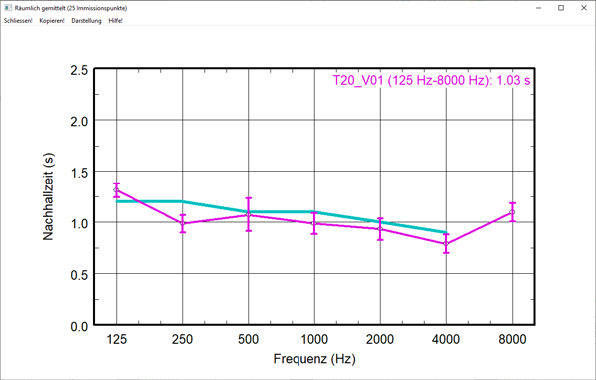 |
Dialog spatially averaged reverberation times (no calibration in progress) |
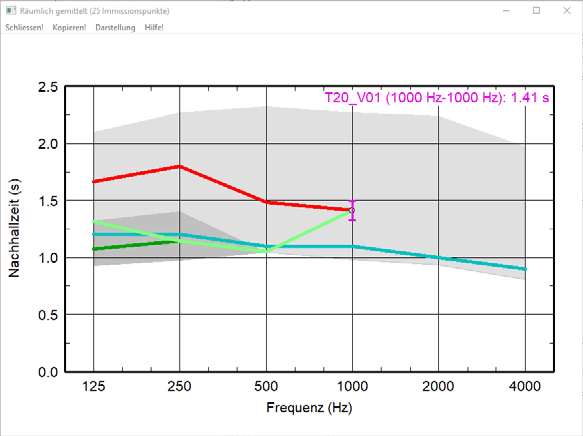 |
Dialog spatially averaged reverberation times during a calibration |
calibrate now(Button)
Starts the calibration process. If the reverberation time dialog is not already open, you will be asked whether it should be opened (recommended for monitoring the calibration process).