Coordinate Grid
A coordinate grids facilitates the input of objects on screen. When the coordinate grid is displayed on the screen it will also appear when copying or printing.
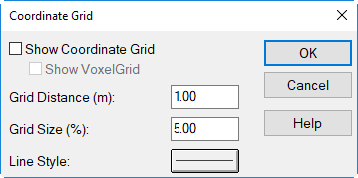
Dialog Coordinate Grid
Dialog options
Show Coordinate Grid
turns the display of the coordinate grid on/off
Show VoxelGrid
When activating this option the grid distance an no longer be specified. Instead of the (xyz equidistant) voxel spacing is used (see Voxel Grid menu). Note that in this case the borders of the voxels are shown and not voxel center points.
Grid Distance (m)
The grid distance (spacing) applies to both directions (x and y).
Grid Size (%)
At a size of 100% the grid will be a mesh of lines.
Line Style
The color, the line width in (mm/10), and the line style can be defined.