Snap point to obstacle
The action "Snap point to obstacle" in the dialog Modify objects (also available in the context menu of selected objects) allows to later set the 2D distance from the nearest obstacle. For example, receivers can be set at a fixed distance of 1m from box-type obstacles or existing vertical area sources can be repositioned to be in small distance in just in front of a barrier.
When the function is applied to line or surface objects, each polygon point is snapped to the nearest obstacle.
Snapping is always performed exclusively at the visible obstacles. By removing the checkmark from "Display object type" (see Appearance), snapping to this object type can be prevented.
All functionality is limited to 2D or the XY plane, the respective heights or Z components are not considered and remain unchanged.
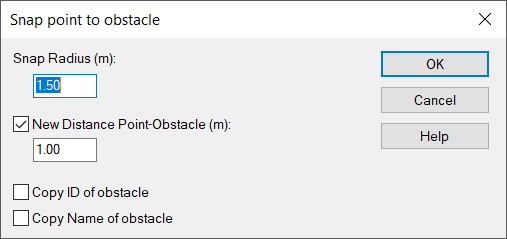
Snap Radius (m)
2D snap radius around the (polygon) point in the xy-plane. Obstacles outside the radius are not taken into account. If there are several obstacles within the snap radius, the obstacle with the shortest distance to the point is decisive.
Option New Distance Point-Obstacle (m)
New distance of the point from the obstacle. Disabled option is equal to distance 0.
Optionen Copy ID of obstacle and Copy Name of obstacle
Option to transfer the Attributs for ID and Name from the obstacle to the snapping object.