Particle Visualization
In this dialog, the maximum number of particles is specified, used for 3D visualization of the propagation of particles (the so-called "particles" in the dialog 3D-View, see 3D-View).
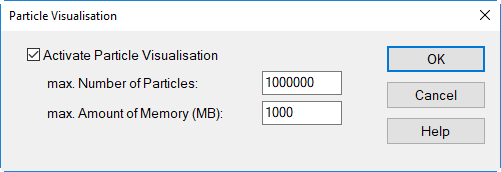
For reasons of PC hardware, it is normally useful to display not all calculated particles, but only a maximum number of particles. The maximum number of particles specified holds for all sources or partial sources.
Dialog options
When particle visualization is active, this will be indicated by a hook symbol in front of the menu command.
Option "Activate Particle Visualization"
This option is enabled by default. After disabling this option, the particle visualization is in dialog 3D view is no longer available (options "grayed-out" on the Representation menu).
max. Number of Particles
Specify the maximum number of particles to be used in the dialog 3D View for particle visualization. Default value: 10000.
max. Amount of memory (MB)
Specify the maximum available RAM memory for particle visualization. Default value: 100 megabytes.
Particle Visualization and CUDA
With CUDA calculations, the particle visualization feature is limited to a maximum of 50th order for software internal reasons.