Specification
Enter the distance between the grid points in x direction and the receiver height above room floor area. By default, only equidistant grids or voxel grids (see Voxel Grid menu) can be specified (default spacing 0.5*0.5 m, height 1 m). When changing the grid spacing it will be asked whether the respective other grid shall be adapted to the same spacing.
In order to use non-equidistant grids see Miscellaneous.
A small distance between grid points leads to a higher density of receivers and, thus, to more detailed level contours of equal sound level in the graphic representation of the lines. On the other hand, a higher density of points also requires more computation time.
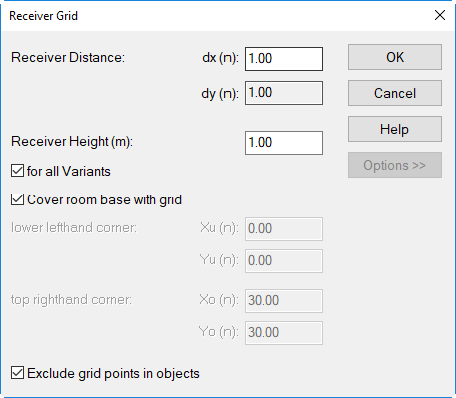
Dialog Receiver Grid (with options)
Option „for all Variants“
With more than a single variant active (see Variants), this option is active by default. In this case, a common grid point spacing is used for all active variants.
When this option is deactivated for a distinct variant and a different receiver distance dx|dy is specified, CadnaR will automatically deactivate this option in all other active variants as well. In these variants, however, the receiver distance itself is not changed.
In case this option is inactive (in a single or in all variants) and the receiver distance is the same for all active variants, CadnaR will automatically activate this option for all variants.
"Options" button
Option "Cover room base with grid"
By default, the grid calculation is carried out for the entire room area. When the option "Cover room base with grid" is deactivated, the coordinates of the lower left corner and the top right corner within the rooms floor size can be entered.
Option "Exclude grid points in objects"
- when activated: By default, grid points within the borders of objects are excluded from the grid calculation.
- when deactivated: In this case the levels on the grid inside the borders of obstacles is calculated as if the screening effect by the objects were not present.