File menu
New
Selecting the command New a new file is created where objects can be inserted. In case the file has been modified and the changes not been stored yet, CadnaR will prompt you as to whether to save the file with changes or not.
Open
see CadnaR (*.cni).
Save
Selecting this command or when clicking the respective symbol on the symbol bar the actual file is saved with changes using the existing filename. In case the file has not been saved yet, the dialog Save as appears (alternative key combination: CTRL+S).
CadnaR files have the file extension *.cni. When saving a file CadnaR will add the file extension automatically.
Save as
By the command Save as a new name can be allocated for the current file.
When using an already existing file name a safety message appears enabling to quit the procedure. When acknowledging the procedure ("Yes") the existing file is overwritten, when refusing it ("No") the procedure is canceled. In this case, specify a new, nit yet existing name for the current file.
Import
see CadnaR (*.cni)
Export
Database
see Database Import (ODBC & XLSX)
Print Graphic
see Print Graphic and PlotDesigner
Print Report
see Print Report
Project-Info
Information on the current project can be entered in the Project-Info dialog. Filled fields are available as local text blocks in Tables | Libraries (local).
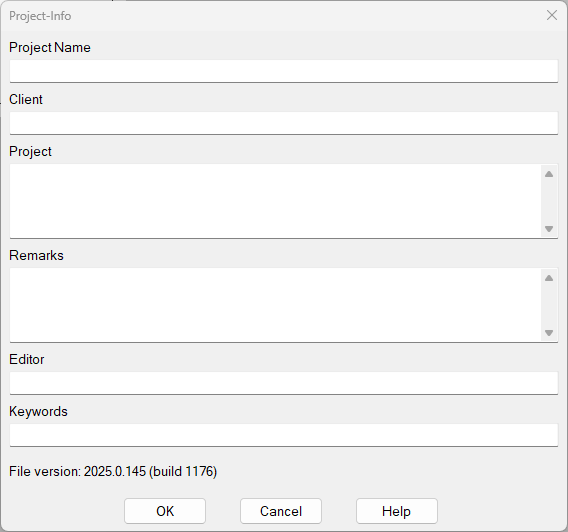
Dialog Project Data
After a file is loaded, the dialog displays the file version.
Local Textblocks
When entering project information, CadnaR automatically generates text blocks for each field. The local text blocks generated in this way begin with the designation PI_ and are written in capital letters.
The following text blocks are generated automatically:
| Name of the text block | Project-Info field |
| PI_TITEL | Project Name |
| PI_CLIENT | Client |
| PI_PROJECT | Project |
| PI_COMMENTS | Remarks |
| PI_AUTHOR | Editor |
| PI_KEYWORDS | Keywords |
To use the text blocks with keywords, see Text Blocks (local).
Last Files
The file paths of the four most recently opened files are displayed. Click on the file name to reopen it.
Exit
The command Exit closes CadnaR. If the present file was edited and has not been saved yet, you will be prompted to save the file prior to closing.