Word document (*.docx)
By this export format, the calculation results or the object tables are exported as an MS Word file (DOCX format). For this, select this file type on the Save as dialog.
„Options“ button
Via the button „Options“ a template file *.docx can be selected or a selected template file can be edited.
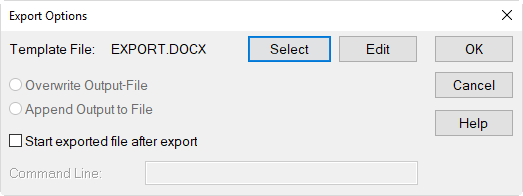
Dialog Export Options (DOCX Export)
For further dialogue options see the previous section.
Template Files for DOCX Export
Template files contain commands that control the printing or the export of calculation results. Keywords (see Keywords) are essential components of these commands.
Structure
The template file for DOCX export is created in MS-Word and may use all available kind of text format. This includes headers/footers, images, running text, and CadnaR specific keywords.
Note
For the generation of tables, see below.
The symbol # (hash) must be avoided - except for keywords. For multi-page output, hard page breaks can be inserted.
The keywords within a DOCX template file are in parentheses as usual, with the symbol # placed in front of the parenthesis. The parameters of the keywords follow after the keyword, but within the parenthesis and are separated by commas.
Types of Tables
There are two types of tables available: user-defined and predefined tables.
Example
Path: Template Files\template_export.docx
For a better understanding, open the referenced DOCX template file using MS-Word. The following explanations refer to this file.
User-defined Tables
User-defined tables are created from rows and columns using the MS-Word table tools. The following rules apply:
- This first row, first column must contain:#(CUSTOM_TABLE,<table keyword>)The <table keyword> is a keyword defined for each object table.NOTE - This cell must be inside a table! This row will get removed on export.
- The subsequent (three) rows containing normal text will remain on export (using the present text formatting).NOTE - Do not use the hash # in normal header rows!
- The following line contains columns that each establish a reference to an object-specific attribute. A reference is established using the table-specific keyword COL:#(COL, <keyword>, <fractional digits>)NOTE - The suffix <fractional digits> applies for numerical object attributes only.NOTE - No further keywords are allowed any of these cells! The formatting of each cell is applied.
- Any lines following the first line with #(COL, ...) are kept, while keywords are ignored. This means that just a single row using the #(COL, ...) statement can be used per table object.
Predefined Tables
There are three ways to use predefined tables:
- „Table-in-line“: The formatting (not using the MS-Word table object) is the same for the entire table and corresponds to this line. Example:# (Table, PQ)
- Table with definition: When the keyword #(Table, ...) is identified in a table, the formatting of the first line is used as header format, and the second line is used as format for the table‘s content. Example:
| #(Table, PQ) |
| Dummy line for formatting (gets deleted) |
- Table using a tbl file (table format file): The format files generated when saving edited object tables have the file extension *.tbl (see Editing Object Tables). An absolute or a relative reference to tbl-files can be established:
- absolute file path, example:
| # (Table, PQ, D:\DATA\cna docx\pq_short.tbl) |
| Dummy line for formatting (gets deleted) |
Relative file path: Just the name of the tbl-file is used in the reference. The tbl-file must be in the same folder as the template file. Example:
| # (Table, PQ, pq_short.tbl) |
| Dummy line for formatting (gets deleted) |
Default Table
The default table of objects can be exported regardless of the object table edited in CadnaR:
- # (Table, <keyword>, default)
Supplied Template Files DOCX
When exporting DOCX you may use the current object table format or define your own table format for export:
- template_export.docx: template files for exporting object tables to MS-Word with a table formatting specified in the template file (exported file in DOCX format)
- template_export_object_tables.docx: template file to export of object tables to MS-Word using the current table format (exported file in DOCX format)