Toolbox
The toolbox contains the symbols for various kinds of objects, for example for sources and obstacles. After click on the bar at the top edge with the left mouse button the toolbox can be moved to a different location with the mouse button pressed. When releasing the mouse button the toolbox is located at its in the new position.
Activate Object Symbol
Click with the mouse on a symbol in the toolbox to select this object type.
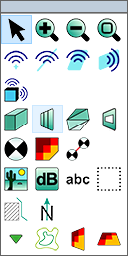
CadnaR Toolbox
Toolbox Objects
Edit Features:
 |
 |
 |
 |
| Edit Mode (CTRL+E) | Zoom + | Zoom - | Zoom to fit |
Sound Sources:
 |
 |
 |
 |
 |
| Point Source | Line Source | Area Source (horiz.) | vertical Area Source | Box-type Source |
Obstacles:
 |
 |
 |
 |
| Box-type Obstacle | Barrier | PolyMesh | verticalPolyMesh |
Objects for Evaluation:
 |
 |
 |
 |
 |
| Receiver | Calculation area | Receiver Chain | vertical Grid | 3D-Grid |
Objects for Display:
 |
 |
 |
 |
 |
 |
| Bitmap | Level Box | Text Frame | Section | Auxiliary Polygon | Symbol |
Special Objects:
 |
 |
| Height Point | Contour Line |
Open Object Table
When selecting an object from the toolbox with keeping the ALT key pressed the corresponding table from the Tables menu is opened.