Calculation Progress
The display of the calculation progress in CadnaR concerns the following types of calculation:
- Calculate Receivers (see Calculate Receivers)
- Calculate Receiver Chains (see Calculate Receiver Chains)
- Free-field simulation (see Calculate Free Field Simulation)
- Calculate Grid (see Calculate Grid)
- Calculate Voxel Grid (see Voxel Grid menu)
During the calculation, the type of calculation is displayed in a separate dialog. For long lasting calculations, the following estimated times are calculated based on past calculation progress and project scope:
- the elapsed time (format hh\:mm:ss) and
- the remaining time for the calculation (format hh\:mm:ss).
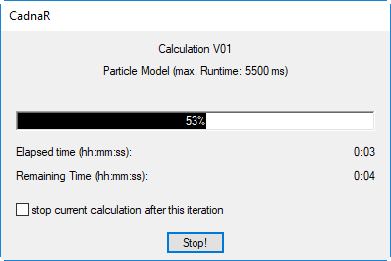
Option „stop current calculation after this iteration“
When applying the sigma criterion ("maximum standard deviation voxel (dB)" or "... IPKT") in the particle model (see Configuration), this option is additionally available.
By activating this option, no further iteration (and thus no further doubling of the number of particles) is started whether the required sigma criterion is fulfilled or not. Instead, the calculation is terminated (but not hard aborted). In this case, you do not have to click the „Stop“ button.
„Stop“ button
By clicking on the „Stop“ button, the calculation can be aborted instantly by confirming with „Yes“. If the option „use calculation results of previous iteration“ is activated, the last, complete calculation is saved. By clicking on „No“ the calculation continues.