Auxiliary Polygon
The object "Auxiliary Polygon" enables to generate open or closed polygon to enhance the graphical representation or for other purposes. The auxiliary polygon has no acoustical relevance within the calculation.
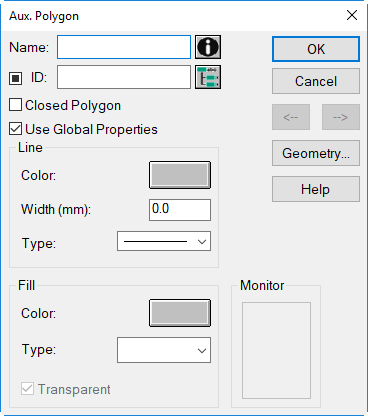
Dialog Auxiliary Polygon
Dialog options
- Name, ID, ObjectTree and Memo-Window see Common Input Data
- Option "Closed Polygon": When this option is activated the first and last point of the polygon are connected with each other and the definition for "Fill" is applied in case the option "Use Global Properties" is deactivated.
- Option "Use Global Properties": When deactivating this option, an individual color, line width and type can be defined for this auxiliary polygon. When activated (default setting) the global settings as defined on dialog Appearance are used.
- Dialog Range "Line": defines color, line width and type. These settings apply only with the option "Use Global Properties" deactivated.
- Dialog Range "Fill": defines the color and the type of fill. These settings apply only to closed auxiliary polygons with the option "Use Global Properties" deactivated.
- Option "Transparent": When this option is activated the object is transparent independently of the settings on dialog Layer (see Layer).
-
Monitor: displays a preview applying the defined settings
-
Button Geometry: see Common Input Data - Geometry