Generate Envelope
When selecting this command, a dialog opens enabling to generate an envelope with associated reveivers. Using this arrangement of receivers, a sound power level „measurement“ in the vicinity of any source assembly can be simulated using CadnaR. When generating the envelope of receivers, a string variable is written (named using the ID prefix entered, see below, followed by the suffix „_P“) showing the respective partial area of the envelope (in m²) considered for this receiver.
Provided the simulated sound power level measurement is carried out in a semi-free field, the command Calc Freefield Simulation (on the Calculation menu, see Calculate Free Field Simulation) can be applied. In this case it is not necessary to retrofit the room surfaces in advance (i.e. fully sound-absorbing walls on a reflective floor).
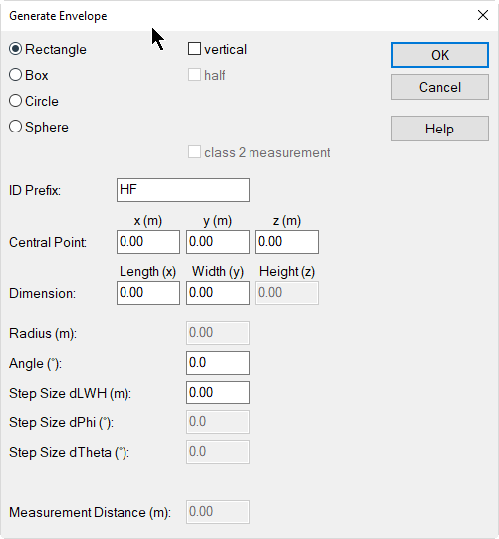
Dialog Generate Envelope
Dialog options
- Rectangle/Box/Circle/Sphere: selecting the envelope‘s shape
- vertical: Rectangle and circles can be generated as vertical surfaces.
- half: Generates for boxes and spheres the upper half of the envelope only.
- class 2 measurement: When selected, the measurement points are arranged according to the standard ISO 3744 (Acoustics - Determination of sound power levels and sound energy levels of noise sources using sound pressure - Engineering methods for an essentially free field over a reflecting plane).
Note
With the option „class 2 measurement“ is checked whether the side length of each measuring surface is 3*d at maximum, where d is the measurement distance (in meters). If appropriate, further measuring points are inserted until the condition is met.
- ID Prefix (Default: HF): Assign a unique ID prefix for the envelope to be generated. This ID prefix required as input parameter in the subsequent evaluation of the envelope (including the group ID, if any, see below).
- Central Point x/y/z (m): center of the envelope
- Dimensions Length (x), Width (y), Height (z): extension of the envelope
Depending on the selected shape one or more of the following options are available in addition:
- Radius (m): applies to circle or sphere
- Angle (°): rotation angle referring to the horizontal
- Increment dLBH (m)
- Increment dPhi (°): applies to circle or sphere
- Increment dTheta (°): applies to sphere only
- Measuring distance (m)
Evaluate Envelope
On the dialog enter the ID prefix of the envelope to be evaluated.
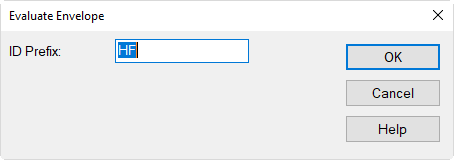
Enter a corresponding ID prefix and click OK.
Note
If the receivers have been assigned to a group (e.g. by using the ObjectTree), this group ID is part of the ID prefix to be entered here. The easiest way is to copy/paste the leading part of the ID string from a receiver being part of that envelope into the input box shown above.
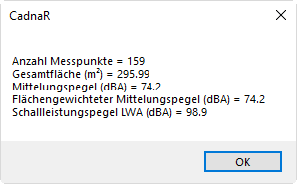
Afterwards a dialog is displayed showing the evaluation results of the selected envelope.
Example