AutoCad DXF (*.dxf)
DXF files can be imported by CAD software. The following CadnaR object types can be exported:
- point, line and area sources (vert./horiz.),
- box-type source and obstacle,
- barrier, PolyMesh and vertical Polymesh,
- receiver, calculation area receiver chain, and
- height point and contour line
Dialog options
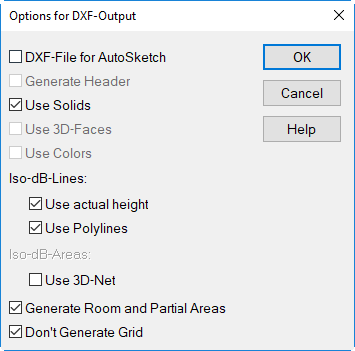
Options for DXF export
DXF-File for AutoSketch
When this option is deactivated DXF files generated match the specifications of CAD software (e.g. AutoCAD). If this option is activated, AutoSketch compatible DXF files are generated with the following properties:
- no 3-D information
- layer identification for AutoSketch (for layers 1 to 10)
- no export of „complex“ objects like 3D-FACE etc.
Generate Header
This option is not available for the time being.
Use Solids
If this option is activated volume objects (e.g. box-type source, box-type obstacle) will be exported as Solids with dxf, otherwise as lifted polylines.
Use 3D Faces
This option is not available for the time being.
Use Colors
This option is not available for the time being.
Iso-dB-Lines
These options require that the grid appearance is set to „Iso-dB Lines“ or „Iso-dB Areas“ on the Grid|Appearance dialog.
- option "Use actual height": With this option active the height (z coordinate) of the iso-dB-lines corresponds to the height of the grid points. With this option deactivated the iso-dB-lines are at zero height.
- option "Use Polylines": With this option active the iso-dB-lines will be exported as polylines, otherwise as separate lines.
Iso-dB-Areas
This option requires that the grid appearance is set to „Grid“ on the Grid|Appearance dialog.
- Use 3 D-Net: If this option is activated, the level distribution is exported as a 3-dimensional height profile, where the height represents the level value.
Generate Room and Partial Areas
With this option active the room and the partial areas will be exported as part of the dxf-data. However, this option makes only sense with CAD-software making use of 3D-data.
Don't Generate Grid
With this option active the receiver points on the grid will not be exported.