Directivities (local)
New directivities are defined and edited on the Directivity table (see Context Menu in Tables). Directivities can be assigned to a point source via the button "Directivity". Double-clicking in a table row opens the dialog Directivity.
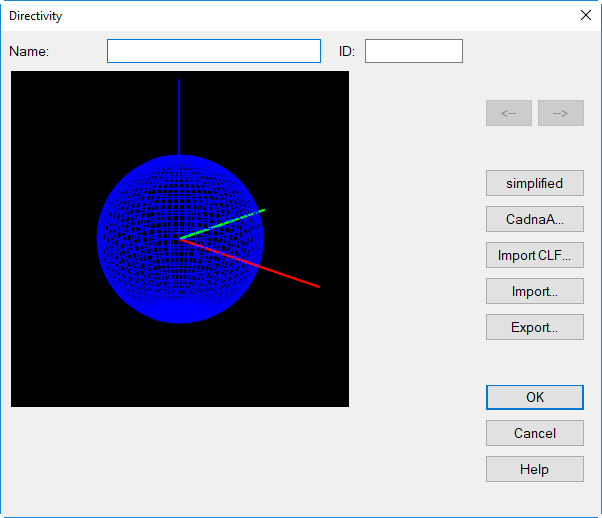
Dialog Directivity
Dialog options
Name / ID
This name will be displayed on the list box in dialog Directivity (accessible via the dialog Point Source, see Point Source).
Arrows <- |->
enable to move between rows in the table without closing the dialog
Button "simplified"
On this dialog a simplified directivity can be defined in the xy plane and/or in z direction, based on level corrections (in dB) in 4 or 8 directions.
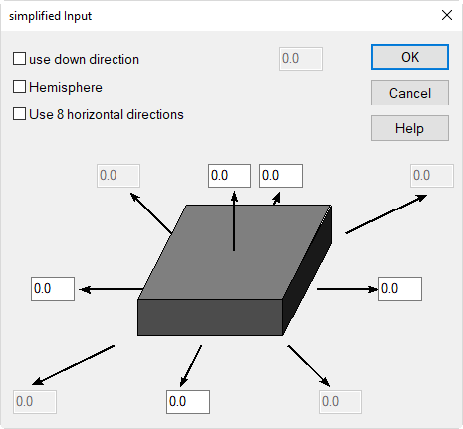
- Use down direction: When this option is active, an additional directivity correction for the downwards direction (in dB) can be specified. This can be relevant with floating box-type sources (i.e. "floating" above the room's floor).
- Hemisphere: By activation of this option a semi-spherical radiation into the upper half sphere is used. In this case, a radiation downwards is no longer possibly.
- Use 8 horizontal directions: When this option is active, the input scheme enables the input of 8 directions of directivity in the xy plane instead of just 4.
Button „CadnaA“
On this dialog, a directivity can be defined using the input format of CadnaA.
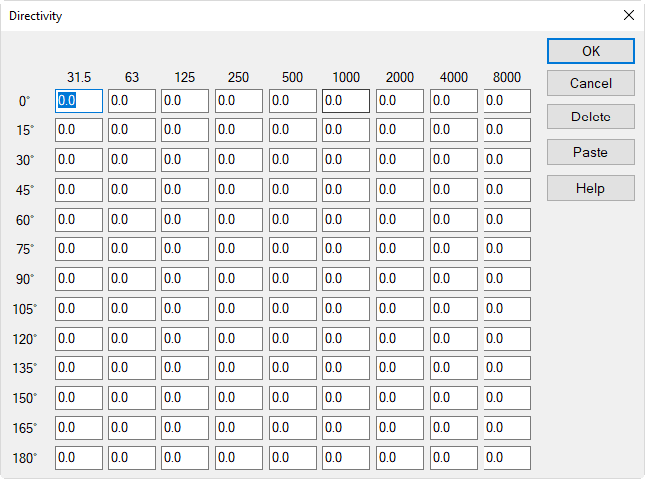
This directivity is axis-symmetrical with respect to the forward direction (the direction of 0 degrees). The directivity vector can be oriented freely in space (specifying the xyz coordinates of the directivity vector).
Entered directional effects are always normalized internally, in order to prevent the directivity pattern to change the sound power level of the source is (sum level = zero).
Dialog options
- Name/ID: The specified name is displayed on the list box "Directivity" on dialog Directivity of point sources.
- Button "Delete": The present values will be deleted without safety request.
- Button "Paste": Directivity data from the clipboard can be pasted into the dialog Directivity. Upon click on button "Paste" the values will be inserted starting from the cell on the upper right. Point and commas are accepted as decimal separators.
Interpolation of intermediate values
In case directivities are just available in larger steps than 15 degrees, delete the zeros for all angles where no values are available using the DEL key. CadnaR will interpolate the values for these angles when the dialog is closed by OK. When reopening the dialog all missing values are inserted resulting from linear interpolation.
Transformation of the Directivity Vector
When addressing a coordinate transformation to point sources the directivity vector is also subjected to the transformation. Recalculate after transforming these types of sources having a directivity addressed.
Export/Import Directivities
In order to use directivities in another projects, export the respective directivity via the dialog Directivity.
Button „Import CLF“
Directivities stored using the file formats *.CF1 and *.CF2 can be imported to CadnaR, see http://www.clfgroup.org/.
The „Common Loudspeaker Format“ is an open file format that speaker manufacturers can use to make loudspeaker data easier to supply and use.
Button „Import XHN“
Directivities stored using the file format *.XHN can be imported to CadnaR.
Button "Import"
Directivities can be imported from the following file formats:
- *.txt (text file with TAB-separated columns)
- *.dat (binary file)
- *.csv (comma-separated values)
This import feature enables to import user defined directivities using a special file format. Proceed as follows in order to generate a user-defined directivity:
- Create a new line in the Directivity table.
- Double-click in the new line.
- Export the format of the directivity file via the button "directivity".
- To this end, enter a filename and open the file in a suitable editor (e.g. WordPad or MS-Excel).
- Edit the file under use of the new directivity data. If the directivity pattern is not available in steps of 5° interpolate linearly between the available values (e.g. using MS-Excel).
- Save the file in one of the available formats *.txt, *.dat or *.csv
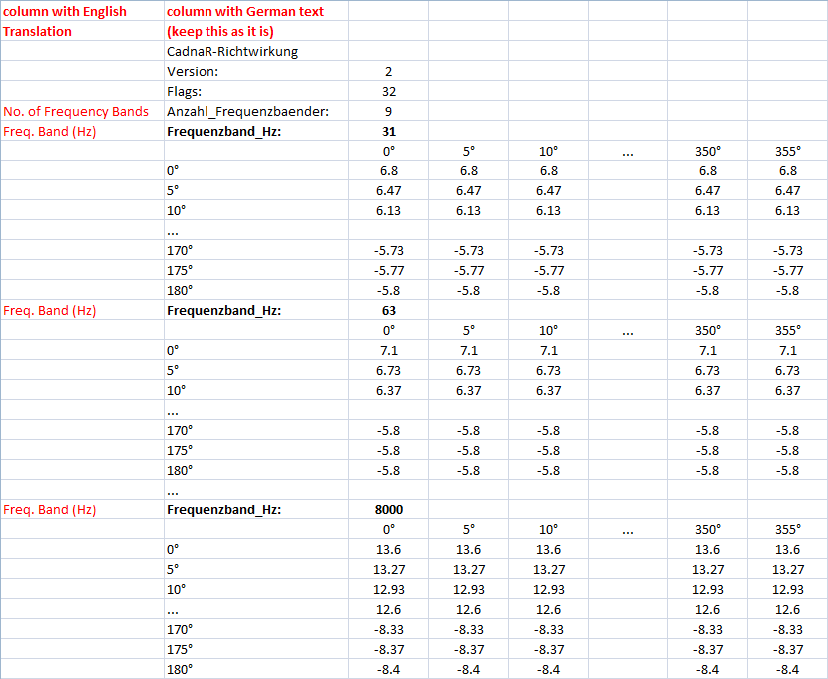
The file consists of the following columns and rows:
- header information (CadnaR-directivity, version, flags, number of frequency bands)
- directivity in dB for the octaves 125 to 4000 Hz
- rows: angle theta ϑ (upper half sphere from 0° to 90°, lower half sphere from 90° to 180°)
- columns: angle phi φ (from 0° to 355°)
Example:
Note
The German text on the file’s first column has to be kept. The English translations are shown in the figure above.
Button "Export"
Directivities can be exported to the following file formats:
- *.txt (text file with TAB-separated columns)
- *.dat (binary file)
- *.csv (comma-separated values)
Note
Entered or imported directivities are internally normalized to a sum level of 0 dB in order not to alter the sound power level of the source.