Delete Duplicates
This command on the dialog Modify Objects offers to delete duplicates of the same object type using specific criteria. This feature is sometimes required after import of data from other applications (e.g. from DWG or DXF).
After selecting an object type, the command just refers to those objects (for example, just to box-type sources).
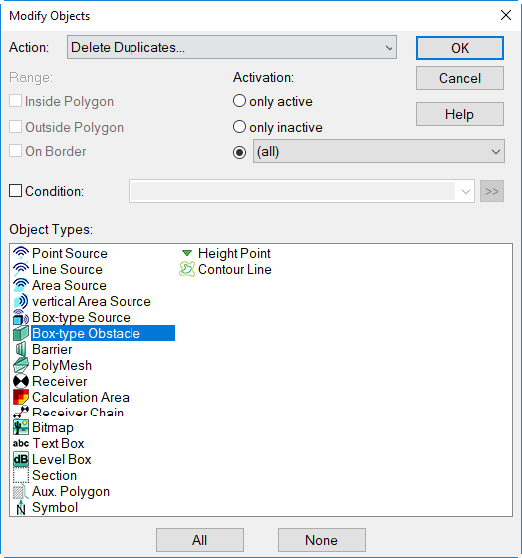
After confirming by OK the dialog Delete Duplicates is displayed where the conditions can be defined.
Dialog options
When defining conditions, the condition is compared with the duplicates before deletion. In this context, the first object in the respective object table will be considered to be the original while the following ones are the duplicates.
Only when matching the duplicate is deleted. In case multiple conditions are defined they must apply in common (logical AND).
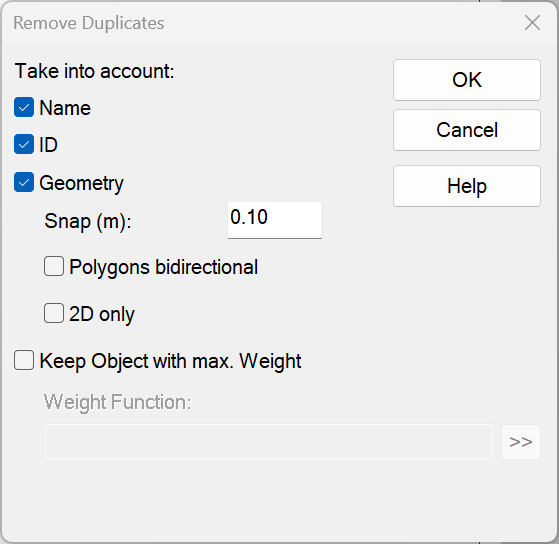
As a limiting condition can be selected individually or in combination:
- Name
- ID
- Geometry:
- Snap: Specify a deviation (in meters) for comparing geometry. Objects not differing by more than this value from the original will be deleted.
- Polygons bidirectional: With this option enabled, duplicates are deleted even when matching based on the specified criteria, but having different first/last points.
- 2D only: With this option enabled, duplicates are deleted when objects match according to their xy coordinates using the specified criteria, but do not with their height coordinates (z).
- Keep Object with max. Weight: This option enables to define a criterion using object attributes (button „>>“) to control of the deletion process.
- Weight Function: A weighting function can be defined using object attributes.
- Example 1: The weighting function is the height attribute z. Upon deletion the object with the highest height z is kept.
- Example 2: The weighting function is the height attribute -z. Upon deletion the object with the lowest height z is kept.
- Weight Function: A weighting function can be defined using object attributes.
- Option „Other Attributes“: not available for the time being