Scattering Coefficient (local/global)
In this table spectra of the scattering coefficient for obstacles can be entered and managed. New lines are generated using the context menu of the table. Double-clicking in a table row opens the dialog Scattering Coeff. Spectrum.
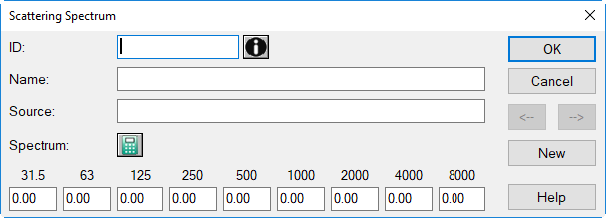
Dialog options
- ID, Memo-Window, Name: see Common Input Data
- Source: description of the data's origin
-
Pocket Calculator Symbol
 : Via this symbol the present spectrum can be modified (see Modify Spectrum).
 -
Octave Bands 31.5 to 8000 Hz: Enter the level in the each octave band here. Consider that a levels 0 dB does not mean "no input" in acoustics. Therefore, when having no data in an octave band available, enter a space or keep the input box empty. This will cause this band to be considered as not valid.
Note
When a value in an octave band of the selected frequency range is missing, a message is displayed indicating the missing data of a spectrum. By ignoring the message (button "Next"), a scattering coefficient of 0% is assumed for this frequency band.
- Arrow Buttons <-|->: to move to the next/previous dataset
- Button "New": generates a new table row below the row currently selected
Pasting spectra via the clipboard
Spectra values separated by tabulator marks can be pasted from the clipboard. Place the cursor into the box which is supposed to receive the first value and press CTRL+V or select the Paste command from the context menu.
Dialog „Modify Spectrum“
By the options available on this dialog the entered spectrum can be modified.
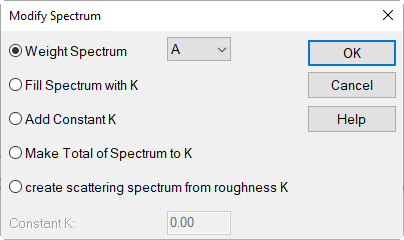
Dialog options
Weight Spectrum
By this option, a subsequent weighting can be applied to the entered spectrum while the setting for the spectrum weighting on the dialog Spectrum remains unchanged. So, when selecting a specific weighting on the dialog Modify Spectrum causes a recalculation and thus a modification of the spectrum originally entered.
From the list box, the selected weighting can be applied to (A, B, C, D) or removed from the spectrum (-A, -B, -C, -D).
Note
This is option is just relevant to sound power spectra.
Fill Spectrum with K
writes the entered constant K into each band
Add Constant K
adds the entered constant K arithmetically to the existing value
Make Total of Spectrum to K
Adds to each spectrum value a constant value resulting in the total level K.
Create scattering spectrum from roughness K
Note
Available for scattering spectra only!
This option offers to generate a scattering spectrum from an entered roughness value K (resulting scattering coeff. at 1 kHz = entered roughness value)
Constant K
value.