Break into Pieces
By the action „Break into Pieces“ on the dialog Modify Objects or on the context menu of a line-like object (e.g. line source, barrier) enables to subdivide an object can be subdivided into several objects of the same kind. When breaking objects all attribute values of the original will transferred to the new sections..
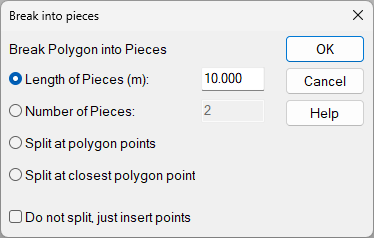
Options
- Length of Pieces: define the length of the new sections („pieces“). The last sections may have a shorter length, tough.
- Number of Pieces: The number determines based on the polygon‘s length the length of each section.
- Split at polygon points: The polygon is split using the present vortex points.
- Split at closest polygon point: When selected the active reference point is blinking. By clicking OK the polygon is broken at the point closest to that reference point.
Checkbox "Do not split, just insert points": Instead of splitting the polygon into separate objects, new polygon points are inserted.